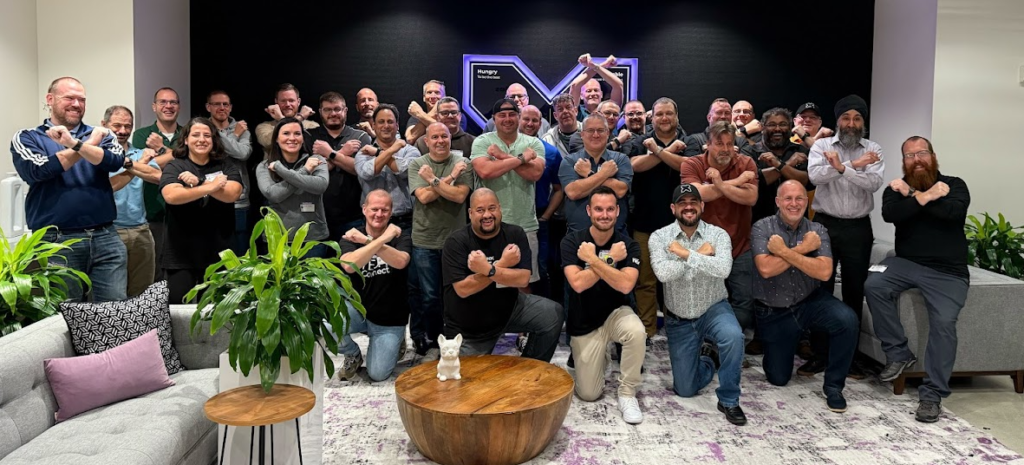
Packing your bags for Silicon Valley always feels special, even for a Nutanix Technology Champion. Tomorrow morning, Saturday, October 24th at 6:30 AM, I am flying out of Lyon Saint-Exupéry. After a short layover at Amsterdam Schiphol, where I will meet up with my fellow European NTC friends and colleagues (Jeroen Tielen, Patrick Damen, Bart Donders, and Jonas Hogman), we will cross the Atlantic together on the same flight to San Francisco before heading to our hotel in San Jose. The goal? Two days at Nutanix headquarters for NTC Tech Connect, an exclusive event masterfully orchestrated by Angelo Luciani. With an agenda almost 100% focused on Nutanix Kubernetes Platform (NKP) and Artificial Intelligence (NAI), I am taking you behind the scenes of this journey to the heart of the Nutanix ecosystem.
From Lyon to Silicon Valley: The Community Spirit of the Nutanix Technology Champions (NTC)
Beyond the eleven-hour flight awaiting us between Amsterdam and California, this kind of trip perfectly illustrates what I love about the NTC (Nutanix Technology Champion) program: its human and community-driven dimension. Sharing this transatlantic journey with experts like Jeroen, Patrick, Bart, and Jonas already turns the flight into a mini technical summit at 35,000 feet.
However, NTC Tech Connect is neither a reward trip nor a marketing keynote. It is an intense technical immersion, under a Non-Disclosure Agreement (NDA), designed by Angelo Luciani for a handpicked group of NTCs to build a direct bridge between the field and the engineering teams in San Jose. Our role as NTCs is not just to listen to the roadmap: it is above all to challenge Product Managers and Distinguished Engineers with our realities as architects, our production constraints, and the concrete use cases of our European customers.
Immersion at Nutanix HQ: Two Days at the Heart of the Cloud Native and AI Strategy
Starting Monday morning, we will dive into two packed days at Nutanix headquarters. Without revealing the specific details of the agenda, the common thread of this edition is crystal clear: supporting modern applications and industrializing AI across our hybrid infrastructures.
Nutanix Kubernetes Platform (NKP): Architecture, Security, and Resilience at Scale
The first major part of our discussions will be dedicated to Nutanix Kubernetes Platform (NKP). For those following the evolution of the ecosystem, NKP is the answer from Nutanix to simplifying and industrializing Kubernetes cluster management, whether on-premises or in the cloud. We are going to dive deep into deployment topology best practices, architectural resilience, and above all, security management at fleet scale. When you have to manage dozens of clusters in production, Day 2 operations and observability become the true critical topics.
Accelerating on AI: From Product Vision to Inference with Nutanix Enterprise AI (NAI)
The other major pillar of this Tech Connect is obviously Artificial Intelligence, and more specifically how it runs on NKP. Far from being just a buzzword, the challenge is to understand how to run AI workloads in a pragmatic, secure, and high-performing way. The planned sessions with the product teams will allow us to dissect Nutanix Enterprise AI (NAI) from the perspective of inference and workflow orchestration (especially around Agent Gateway concepts). This is exactly where the current challenge lies: offering enterprises a turnkey platform to consume AI models without adding complexity to the underlying infrastructure.
Conclusion: The Human Adventure and What’s Next on the Blog
Beyond the intense technical sessions, this NTC Tech Connect is also a true human adventure. The community evenings planned in San Jose will be the ideal opportunity to extend our discussions over a drink and compare feedback from our respective projects. It is often during these passionate exchanges that the best ideas are born!
My return flight will take off from San Francisco on Wednesday, October 28th, landing back in Lyon on Thursday afternoon, October 29th. Once I have recovered from the jet lag and sorted through my notes (filtering out everything that remains under NDA), I will see you very soon on the blog for a complete debriefing of what was shared with us. Until then, feel free to follow me on X (Twitter) and LinkedIn, where I will be sharing some live behind-the-scenes moments from this Californian trip!
In September 2024, I published an article about building a homelab on Nutanix CE in which I wrote that the first question to answer was the one about usage: throwaway virtual machines to build up skills, or services for yourself and your family? I answered “tests”, and I built my whole infrastructure around that answer.
Two years later, the answer has changed and the infrastructure has not moved an inch. Before starting the work, here is what my Nutanix homelab looked like on 1 July 2026.
My Nutanix homelab as of 1 July 2026
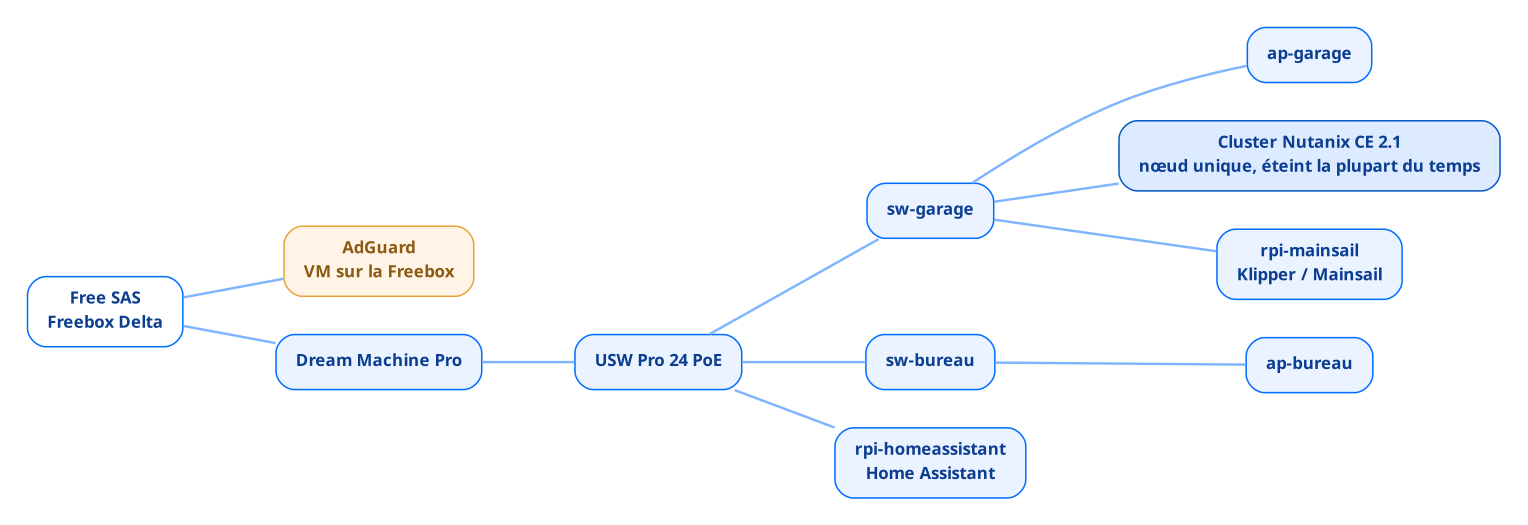
On that date, everything running at home sat on three machines. The network first, installed four years ago when the house was built and entirely Ubiquiti: a Dream Machine Pro, a USW Pro 24 PoE switch and a few Flex units spread across the rooms, all connected to a Freebox Delta on 10 Gb/s fibre.
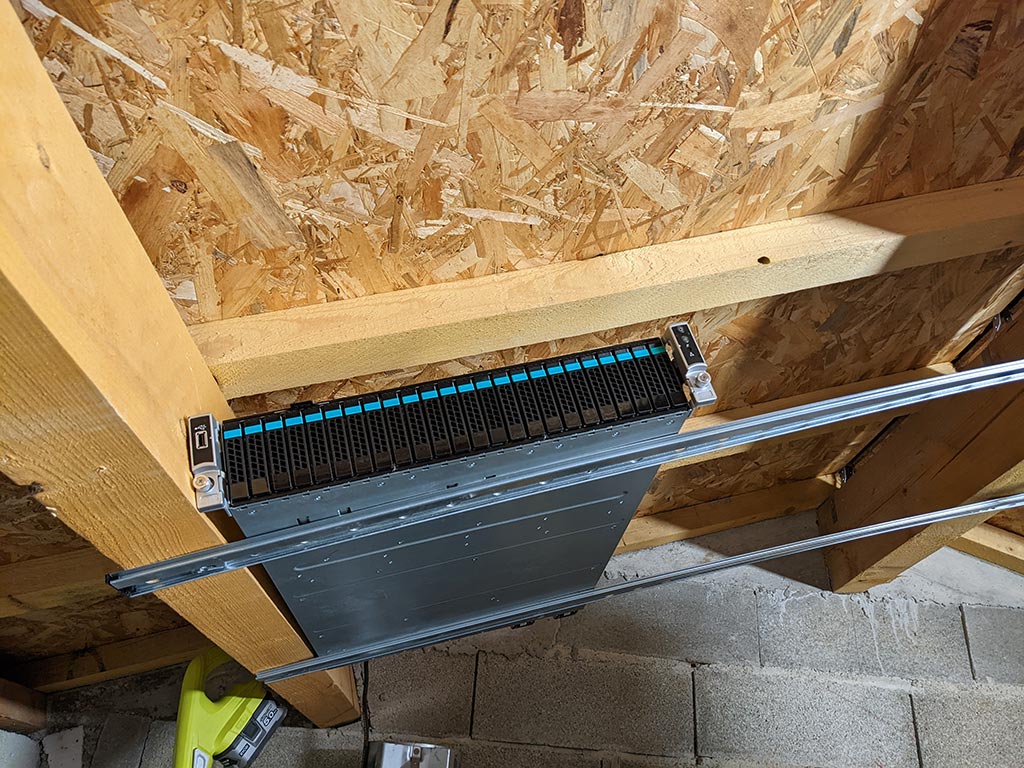
The cluster next, an Intel S2600WTTR chassis installed in the garage because it is not allowed inside the house, on sliding rails screwed straight into the joists for lack of a proper rack, a single node running Nutanix CE 2.1, with two or three test virtual machines on it. I described its hardware configuration back then, and I invite you to read my article on the subject.
I recovered this 2016 server from a previous job. It had suffered a hardware failure and the administration did not want to pay for the repair, given its age and the infrastructure replacement already under way towards brand new Nutanix clusters. So I took it out and brought it back to life at my own expense.
Every other hardware decision follows from that starting point. Only one power supply connected out of two, on purpose, because nothing critical runs on it and a failure means at worst a cluster down for a weekend, then partial disk redundancy which I already accepted back then as a compromise. On sizing, however, I never hit the slightest limit: 384 GB of RAM, four 800 GB SAS SSDs and six 10k drives for two or three test virtual machines, headroom that served no purpose.
And that is all, or nearly. Two services live outside the cluster: Home Assistant on a Raspberry Pi, which already collects the consumption of the Meross plug connected to the server and the output of my photovoltaic installation, and AdGuard on a virtual machine hosted by the Freebox. DNS resolution for the entire house therefore relied on my ISP’s box: one slightly long reboot, one change of subscription, and nothing resolves any more.
What the network audit showed
Before touching the cluster, I went through the UniFi configuration in detail, on a version older than UniFi OS 5.1.33. The result is less flattering than the hardware.
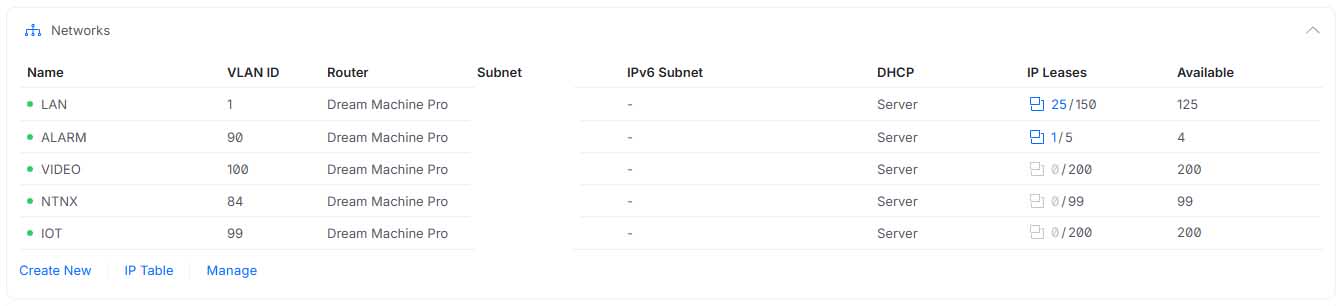
The native network is 192.168.2.0/24 and carries VLAN ID 1 in the controller, a gap between naming and reality that stings as soon as you read your own configuration again six months later. Then four SSIDs, all on 2.4 GHz and all on WPA2, one of them hidden for the video surveillance, which has never protected anyone and mostly makes life harder for the devices that have to associate with it. The Tapo cameras, precisely, sit on Wi-Fi on that same native network: the devices I have the fewest guarantees about share the segment with everything else.
The inventory turned up the rest. Four VLANs declared next to the native one, ALARM on 192.168.90.0/29, VIDEO on 192.168.100.0/24, NTNX on 192.168.84.0/24 and IOT on 192.168.99.0/24, three of which have never handed out a single DHCP lease. Meanwhile twenty-five devices share the LAN, cameras included, while the VIDEO VLAN meant for them has been sitting there empty since day one.
That is what happens when you draw a segmentation on installation day and never read it again afterwards.
So there is no segmentation, only declared VLANs. And the reason is the same as for the cluster: my time went elsewhere.
What a Nutanix homelab costs when you only power it on demand
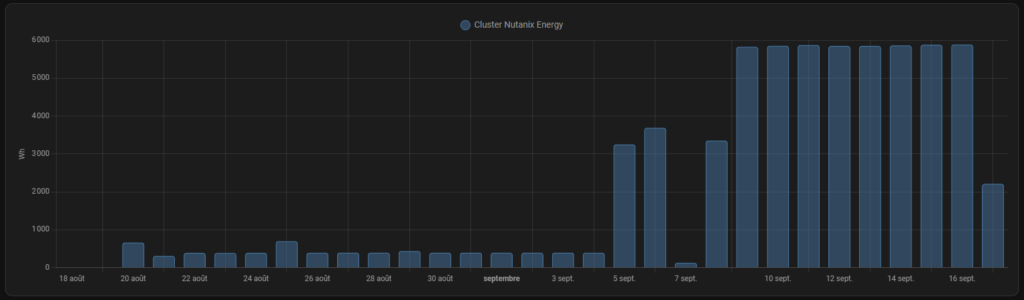
In 2024, I plugged a Meross smart plug into the cluster and fed it into Home Assistant to know exactly what this machine was costing me. Around 5,850 Wh per day with the cluster powered on, which projects to 2,138.9 kWh over a full year and close to 535 euros at the regulated tariff, assuming the server is on every single day of the year.
The number I was not expecting is the other one: with the server switched off, it still draws between 300 and 400 Wh per day, only to keep the IPMI and the power supplies alive. Over a year that is 110 to 146 kWh and around thirty euros for a machine that does nothing. The details of the measurement are in the article I wrote on the subject.
The rule imposed itself: the cluster only powers on for tests and for writing articles. And that is exactly what blocks everything else, since an infrastructure you boot on the evening you need it cannot host any service that has to answer around the clock, which rules out pretty much everything a house expects from a server.
I left things as they were for two years because I had other projects on my plate.
What did not exist
On 1 July 2026, I had no internal DNS, no reverse proxy, no monitoring, no secrets management, and no backup system at all.
Each of those gaps is painless as long as the virtual machines are disposable. You reach a VM by its IP address because you only have three of them, you monitor nothing because an outage bothers nobody, and you do not back up what you plan to destroy at the end of the test.
Over time my needs changed, and today I want to run local applications that the whole family will use. The five gaps then show up all at once, because none of them is visible until something has to survive a reboot.
The only addition in two years: Mainsail
Between my 2024 article and today, one single thing has moved. In December 2025, I installed Klipper and Mainsail to drive my 3D printer, on a Raspberry Pi sitting next to it.
I did not even consider another option. AHV does not do USB passthrough, the Nutanix KB is clear on that, and the cluster spends most of its time powered off anyway. There is one avenue I am keeping for the rebuild, VirtualHere, which exposes a USB device over the network and presents it to a virtual machine without any hardware passthrough. I have not tested it yet.
The electricity bill ended up dictating the architecture, and for two years it produced the same decision every time a new need came up.
So there is the inventory. A test cluster switched off almost all the time, two Raspberry Pi boards hosting applications and an ISP box acting as a DNS server. It works, and it cannot carry anything more.
That is where the work starts. I need a base that stays on and stays frugal, a DNS and a reverse proxy that belong to me, verified backups, monitoring, somewhere to keep secrets… and a Nutanix cluster that goes back to what it is good at: breaking things. That is what I will be writing about in the articles to come.
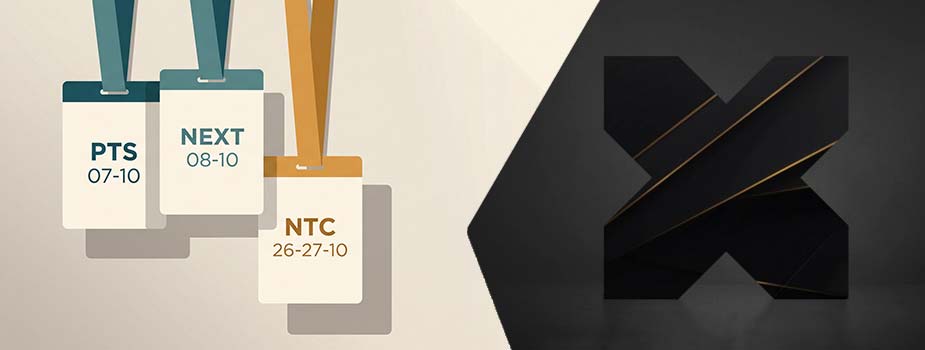
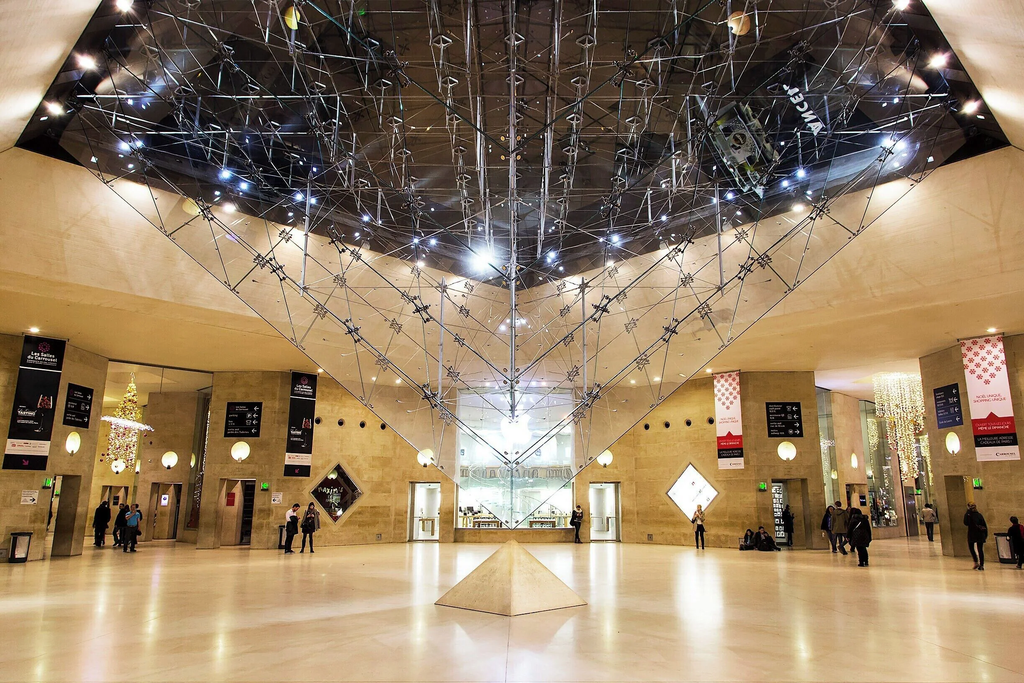
Three dates in my October calendar, two cities, one vendor: Nutanix. On 7 and 8 October, .NEXT on Tour Paris 2026 takes over the Carrousel du Louvre, and I will be there both days, first at the Partner Technology Summit, then on the Inetum booth. Three weeks later, off to San Jose for NTC Tech Connect. If you are joining any of these, here is where to find me.
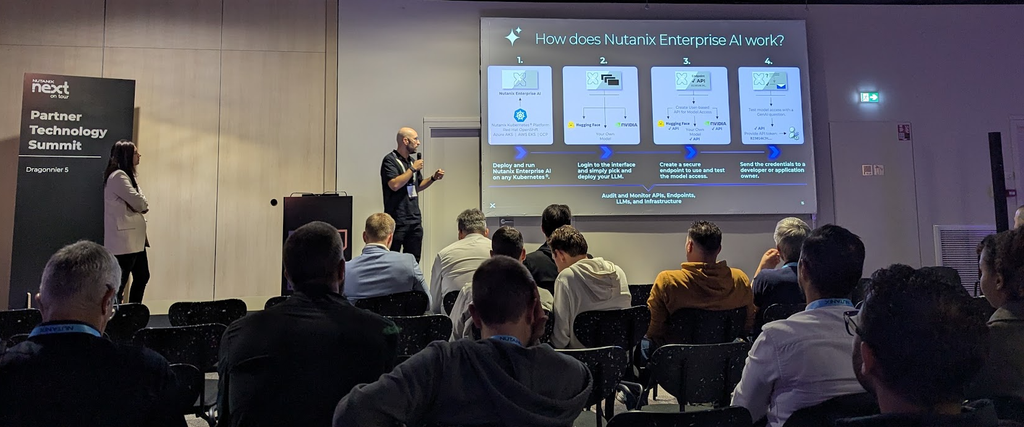
7 October, the Partner Technology Summit
The Paris edition of .NEXT on Tour runs over two days this year, and the first one is not open to everyone. 7 October is reserved for partners, with the Partner Technology Summit on the technical side and the Partner Sales Summit on the commercial side, each with its own registration. If you are a Nutanix customer, the day that concerns you is the one after.
I am going as an attendee, wearing my Solution Architect hat, and mostly for NKP, the Nutanix Kubernetes platform. This is the kind of day where you get to ask precise questions to the people who build the product, which beats reading release notes on a Friday evening.
One more change compared with the 2025 edition: we are leaving the CNIT La Défense for the Carrousel du Louvre.
8 October, on the Inetum booth
On the 8th the doors open to everyone, and that is the day I will be hardest to reach: I am running the Inetum booth with Mathieu Croisy, technical director of the Inetum CdSI, Jérôme Morlier, alliances director, and Arnaud Houllier, Product Line Expert, with two demos running all day long.
The first one is about getting off VMware. Nutanix Move relocates the machines and does it well, the hard part of a take out sits upstream: taking inventory of the source estate, analysing the workloads, splitting the migration into waves, validating every cutover… That is the part our migration tool industrialises, and the part we are showing, because that is what decides whether a project holds its schedule.
The second one is about AI-assisted cluster administration, with a tool we are developing at Inetum. I will not say more here. You will have to stop by the booth to see it run, which is rather the point of showing up.
Here is the one piece of information that justifies blocking out the day on its own, even without a sales meeting: a testing centre is open on site on the 8th, and the exams are free.
The announced catalogue mixes two generations, and that is worth a look before you register. In 7.5 you have NCA, NCP-MCI, NCP-CN and NCP-US. In 6.10, NCP-MCA, NCP-EUC, NCP-CI for both AWS and Azure, and NCP-DB. NCS-Core stays on 6.8. If you have revised on a version other than the one on offer that day, you will feel it, so check this before booking your slot.
Two prerequisites you do not want to discover while queueing:
your laptop and its power supply, the exam runs on your own machine
That leaves you a month to revise, which is short without being unrealistic. If you are aiming at one of the certifications in the catalogue, the resources on ntnx-mastery.com are built for exactly that, and they are free.
26 and 27 October, back at NTC Tech Connect
Three weeks later, a change of scale and of time zone: two days at Nutanix headquarters in San Jose, with the other Nutanix Technology Champions. This is my second time, the first was in 2024, since the event did not take place in 2025.
The principle fits in one sentence: sessions with the product teams and the people who build the thing, inside their own walls. Part of the programme will be under NDA, part of it will be publishable, and I will not know exactly where the line falls until the agenda comes out, which has not happened yet. Whatever can leave the room will end up here, the rest stays in the room.
I am also looking forward to these two days for a less technical reason: catching up with Jeroen, Kim, Brad, Patrick, Drew and everyone I sadly missed at .NEXT in Chicago.
Three dates, then, and as many articles to come, within the limits of what I will be allowed to tell: the Partner Technology Summit programme, the questions that keep coming back at the booth, whatever San Jose is willing to let out…
In the meantime, if you are at the Carrousel du Louvre on the 8th, come and say hello at the Inetum booth. We are there all day.
This weekend I set out to move the IPMI of my lab Nutanix node onto my management segment. I changed the card’s address and the switch port’s VLAN profile within the same minute. The node had just been wiped, it had no operating system left, so there was no way to fix anything from the inside, and the card vanished from the network.
What gave me back the controls came down to an IPv6 link-local address and two commands, a quarter of an hour all told. Here is the method, on Windows 11 and on Rocky Linux.
The evening my IPMI vanished from the network
Two changes in the same minute left me no way of telling which one had broken what. I plugged a laptop straight into the dedicated IPMI port of this Supermicro SYS-5019D-4C-FN8TP to get back in.
On a running node, ipmitool locally settles that kind of blunder in a single command through the KCS interface, without going anywhere near the network, but a freshly wiped server closes that door. If you are in the opposite situation, with the card reachable and the password lost, I covered that case here: lost IPMI password on a Nutanix or Supermicro node.
Why link-local answers when IPv4 stays silent
Every active IPv6 interface carries an address starting with fe80::, which it builds on its own from its MAC and without DHCP. A machine whose IPv4 is wrong or missing therefore keeps a reachable identity on its segment. The ff02::1 address is the all-nodes multicast group: a ping to that group makes everything living at the end of the cable answer, and an IPMI powered in standby answers even with the server switched off. Multicast does not cross a router, so you do have to sit on the same segment as the card.
One detail settles the case for this method, which I only saw later while reading back my card’s configuration on firmware 01.74.13: the line “ARP Responses Enabled, Gratuitous ARP Disabled”. The IPMI never announces itself on the network, so listening passively on the segment gets you nowhere.
Finding the card on the cable
The principle is the same on both systems: identify the interface, send the multicast, read the neighbour cache.
On Windows 11
Spotting the adapter and its index:
Get-NetAdapter
The ifIndex column gives you the number to reuse afterwards, index 3 in my case.
On a direct link there is no DHCP server at all, and an interface left on automatic falls back to APIPA on 169.254.x.x, in which case nothing will ever ping, even against an IPMI in perfect health. Set a static address:
Sending the multicast, with the interface index as the zone suffix:
ping -6 ff02::1%3
Reading the discovered neighbours, with their MAC address:
Get-NetNeighbor -InterfaceIndex 3
On Rocky Linux
Identifying the interface:
ip link show
Sending the multicast:
ping6 -c4 ff02::1%ens0
Command output:
PING ff02::1%ens0(ff02::1%ens0) 56 data bytes
64 bytes from fe80:0:0:0:225:90ff:feb8:f313%ens0: icmp_seq=1 ttl=64 time=0.659 ms
64 bytes from fe80:0:0:0:225:90ff:feb8:f313%ens0: icmp_seq=2 ttl=64 time=0.288 ms
Matching the addresses to their MAC:
ip -6 neigh show dev ens0
One subtlety costs time when you move from one system to the other: the zone suffix takes an interface name on Linux and a numeric index on Windows, and an address copied from one console to the other fails without any explicit message.
Reading the vendor straight from the address
When a link-local address carries ff:fe in the middle, it derives from the MAC through the EUI-64 method, and the operation reverses in your head. Drop the two ff:fe bytes from the middle of fe80::225:90ff:feb8:f313, you are left with 02:25:90:b8:f3:13, then flip the second bit of the first byte: 02 becomes 00, which is a Super Micro Computer OUI.
Opening the web interface over link-local
The address you have recovered goes straight into a browser, in square brackets and followed by its zone suffix:
https://[fe80::225:90ff:feb8:f313%3]
The suffix is mandatory, a link-local address being unique only on a given segment. If your browser refuses that format, curl will at least confirm the service answers, with the % escaped as %25 and the -g option, without which the brackets are treated as globbing:
Once the interface was open, the answer came down to one line on its network page: the card was carrying 192.168.10.11, when I thought I had configured 192.168.10.1. The port’s VLAN profile had nothing to do with it, and the address I had typed belongs to the machine hosting my DNS. Reconfigured on the right address, and it was back.
My management cards now live in a reserved range at the bottom of the segment, with a matching DHCP exclusion, the lab node on .1 and the production node on .2. And I have stuck to a simple rule since: one change at a time, checked before the next one.
A little misadventure happened to me recently. After changing the IPMI password on my 1-node, I couldn’t log back into my node’s management interface. Forgot it instantly? Typo? Botched copy-paste? Whatever the reason, the access lockout was very real.
Losing your IPMI password (or BMC) is enough to make anyone break a sweat. But rest assured, experience has taught me a golden rule: as long as you still have access to the host operating system (whether it’s AHV, a standard Linux, or even ESXi), you can regain control without needing to perform a hardware reset.
However, the situation can be more critical than it seems. For the experts reading this, you know that in a NutanixSingle-Node environment, IPMI isn’t just an administrative convenience: it’s your one and only fail-safe. Without it, you can’t mount a Phoenix ISO via Remote Media during a major AOS crash or force a reboot. Losing BMC access on such a node quickly becomes a critical bottleneck for your production and remote console access.
In this guide, I’ll share the different methods to regain control of your node in a matter of minutes, from the gentlest approach to the last resort.
Method 1: In-band Reset via ipmitool
If you are running Nutanix AHV or a classic Linux distribution, you’re in luck: the ipmitool utility is usually available natively. The trick here relies on the KCS (Keyboard Controller Style) hardware channel. Simply put, this allows the host OS to communicate directly with the BMC chip via the motherboard bus (LPC/PCIe), entirely bypassing the management network.
Identify and Overwrite the Admin Account
Log in as root on your host. As a precaution, first ensure that the kernel modules managing IPMI are loaded:
modprobe ipmi_si
modprobe ipmi_devintf
Next, we’ll list the configured users (usually on channel 1) to spot the ID of our administrator account. In 99% of cases, the default account (ADMIN) corresponds to ID 2.
ipmitool user list 1
In my case, the ID is indeed 2:
Once the ID is confirmed, the command to force a new password is child’s play:
ipmitool user set password 2 'MyNewPwd123!'
When entering the previous command, the terminal might throw a nasty Invalid data field in request error.
Don’t panic; it’s simply the security policy parser of some firmwares rejecting your request. Not only does it require a minimum complexity (8 characters, uppercase, lowercase, number), but it can also be picky about the request format.
To bypass (or rather, satisfy) this mechanism, force the encoding length to 20 bytes by simply appending 20 to the end of your command:
ipmitool user set password 2 'MyNewPwd123!' 20
Your password has now been overwritten. You can test the connection to the web interface.
Method 2: The IPMICFG Utility (The Solution for VMware ESXi)
If you are running VMware ESXi, the first method might leave you stranded. Why? Because ipmitool is not packaged natively, and resolving dependencies to compile it on a hypervisor is a waste of time that I wouldn’t recommend.
The workaround is called IPMICFG. This is the official tool provided by Supermicro (downloadable from their portal with a free account). Its massive advantage is that it comes as static binaries, ready to use for Linux, Windows, and crucially, ESXi.
Once the archive is transferred to your host and extracted, using it is very straightforward:
./IPMICFG-Linux.x86_64 -user list
./IPMICFG-Linux.x86_64 -user setpwd 2 MyNewPwd123!
Note: Adapt the binary name if you are using the Windows or ESXi version.
Extreme Case: The Node No Longer Has a Bootable OS
What if the OS won’t boot at all? This is usually where the sweating starts, thinking that without network access to the IPMI or a functional OS, the only remaining option is a factory reset.
Remember: the KCS interface is exposed at the hardware level as soon as the BIOS POST completes. It is completely independent of your storage’s state.
All you have to do is boot the server from a USB stick containing a Linux Live CD (Ubuntu, Rocky Linux). Once on the live desktop, open a terminal, install the utility if it isn’t already there (e.g., apt install ipmitool), and run the exact same commands from Method 1.
Last Resort Method: The BMC Factory Reset
If for some obscure reason the previous methods fail, there is one ultimate resort left: resetting to factory settings.
With the Supermicro tool, the command is direct:
./IPMICFG-Linux.x86_64 -fd
And if you prefer the pure ipmitool method, you need to send a RAW command:
ipmitool raw 0x3c 0x40
⚠️ Warning, the consequences are heavy: Your entire BMC configuration is wiped clean. You will lose the static IP (the port reverts to DHCP), VLAN configurations, and user accounts. The BMC will then reboot (expect a good 2 to 3 minutes). Pay close attention to recent generations of servers: the password may not revert back to ADMIN/ADMIN. It defaults to the unique password printed on the OCP label (often stuck on the chassis or motherboard). Keep this in mind if your server is physically located on the other side of the world!
My Recommendations
Once access is recovered via method 1 or 2, here is what I systematically do to cover my back:
The Password Manager: It’s basic, but save your creds immediately instead of keeping them in your copy-paste clipboard.
The Backup Account: Create a second administrator account.
The Slot ID Trick: Do not put your backup account on Slot ID 3. Force its creation on a higher Slot (like 5 or 6). Why? Because some infrastructure automation scripts have the annoying tendency to forcefully overwrite or modify the early Slots (2 and 3) during provisioning. By placing it further down, you safeguard it.
What about you? Have you ever locked yourself out of one of your nodes? Share your worst nightmare in the comments below!
As many of you know, my raw development level oscillates somewhere between absolute zero and “it miraculously started working”.
But now, the game has changed. Artificial intelligence, and more specifically CLI (Command Line Interface) coding agents like Claude Code, have given me superpowers. Suddenly, coding is no longer an insurmountable mountain, but a conversation. However, there’s a catch: to converse with the machine, your environment needs to be rock solid. And developing on Windows, historically, was a bit like trying to fit a square peg into a round hole.
Fortunately, WSL (Windows Subsystem for Linux) is here. The idea behind this guide? To save you from the cold sweats I experienced. I’m going to show you how to set up a clean Ubuntu environment on Windows, pack it with the necessary dependencies (Cargo, npm), install Claude Code, and connect it all seamlessly to Visual Studio Code.
Why bother with WSL2, you might ask? Quite simply because it allows us to completely isolate our AI tools. Claude Code will run in its own Linux sandbox, with native I/O performance, all completely independent of our Windows system. We keep full control.
Ready to transform your Windows machine into an AI-boosted development station? Follow the guide, I’ve cleared the minefield for you.
1. Enable and install WSL (Windows Subsystem for Linux)
Let’s not lie to ourselves: there was a time when installing a Linux environment on Windows was a real obstacle course. You had to dig into obscure menus, check “Windows Features”, and pray very hard. Today, Microsoft has caught up, and it all comes down to a single command line.
Installing WSL
Start by opening PowerShell as an administrator (right-click on the Start menu > Windows PowerShell (Admin) or Terminal (Administrator)).
Simply type this command and press Enter:
wsl --install
Let the magic happen. Once it’s finished, the golden rule of IT applies: restart your PC. This isn’t optional; Windows needs this reboot to activate the virtualization components at the system level.
WSL: Choosing your distribution
Upon reboot, WSL is there, but we’re going to make sure we install the right distribution. Reopen PowerShell (no need for admin rights this time).
To see what’s available in the “catalog”, type:
wsl --list --online
In our case, we’re going with the absolute standard, Ubuntu. That’s where the community is largest, and where you’ll find the most solutions if you ever run into an error message.
Launch the installation with:
wsl --install Ubuntu
A terminal window will open, asking you to create a UNIX username and a password.
Why does WSL2 change everything? For the more curious, you should know that this command enables WSL2 by default. This detail is crucial. Gone is the first version (WSL1) where Windows clumsily tried to translate Linux commands on the fly. Today, WSL2 uses a genuine, ultra-lightweight virtual machine (based on Hyper-V) with a real Linux kernel optimized by Microsoft. The result? 100% compatibility with development tools and blazing-fast file access (I/O) performance, which will be vital for Claude Code to read our code quickly.
2. Prepare the Ubuntu environment
Alright, the Linux distribution is installed, but a brand-new Linux system is like an empty apartment: it’s very clean, but you can’t do much in it.
Before bringing in our AI super-agent, we need to bring in the furniture, or rather the dependencies. Many modern CLI tools rely on very specific ecosystems.
Install Cargo (and our first AI tool)
For my own experiments, I often use the Rust ecosystem. So we’re going to install its package manager, cargo.
Type this into your Ubuntu terminal:
sudo apt install cargo
Why Cargo? Because it will allow us to install tools directly from their source code. For example, I use rtk, a highly practical AI framework. To install it, it’s as simple as this:
cargo install --git https://github.com/rtk-ai/rtk
Let it compile. It’s beautiful to watch (even if, I admit, I often watch these dozens of compilation lines scroll by like a deer in the headlights, just praying there won’t be any flashing red text at the end).
What is RTK for, you might ask? Well, it saves Claude Code tokens through automations, allowing us to chat longer with Anthropic’s AI to preserve our quotas.
Install Node.js and npm
Next, Claude Code and many other agents use web technologies. Therefore, we need npm (Node Package Manager).
Run the command:
sudo apt install npm
If a bearded and/or bald senior developer is reading this tutorial, he’s going to choke: “Ju, you never install npm via apt, it installs an old version and creates permission errors!”. And he would probably be right. The “real” best practice is to use NVM (Node Version Manager). However, let’s be pragmatic: for our specific goal of running Claude Code CLI today, the stable version provided by the Ubuntu repositories does the job perfectly. If, later on, you start racking up EACCES type errors when installing other global packages, you’ll know it’s time to clean it all up and switch to NVM!
3. Install and configure Claude Code
The official installation script
To install Claude Code, Anthropic made things simple. Well, “simple” in a Linux way. We’re going to use a tool called curl which will download a script from their servers and execute it directly on our machine.
Type this into your Ubuntu terminal:
curl -fsSL https://claude.ai/install.sh | bash
Normally, tossing an unknown script found on the net directly into your machine’s bash is the digital equivalent of picking up a USB drive on the sidewalk and plugging it straight into your PC. But hey, this is Anthropic, we’ll assume they don’t want to mine bitcoin on our backs.
The script will do its thing for a bit. And then, full of hope, eyes shining, you type claude in your terminal. And bam… claude: command not found.
Frustration. Cold sweats. Don’t panic, it’s a classic trap.
The infamous PATH trap
Why doesn’t it work on the first try?
Because Anthropic does things properly by respecting the principle of least privilege. Instead of brutally installing Claude Code at the root of your system (which would require super-administrator root rights and could break everything), the script places the executable in a neat little hidden folder of your own: ~/.local/bin.
The problem is that your Ubuntu system doesn’t look in this specific folder by default when you run a command. You have to explicitly show it the path. This is what we call the $PATH environment variable.
To fix this once and for all, we’re going to add this famous folder to our PATH. Copy and paste this line (be careful, copy it exactly with its quotes):
This double command does two things: it writes the correct path at the end of your personal configuration file (.bashrc), and it asks the terminal to re-read this file immediately to apply the change (source).
Now, type claude or claude --version again. If a menu or a version number appears: you’ve won!
4. Final integration with VS Code
It’s all well and good to have the Claude CLI running quietly in a terminal on WSL, but the idea is still to have it read and write code comfortably. And for that, we need our trusty Visual Studio Code.
The WSL extension for VS Code
Open VS Code normally, on Windows. Go to the extensions tab and search for WSL (formerly Remote – WSL, published directly by Microsoft). Install it.
Once installed, look at the very bottom left of the VS Code window. You will see a small blue (or green) icon with >< chevrons. Click on it, and choose the “Connect to WSL” option.
A new VS Code window will open. In the bottom left corner, it now says “WSL: Ubuntu”. Bingo.
This is where the power of the architecture I mentioned earlier hits hard. When you open a project this way, VS Code installs a mini-server directly inside your Linux machine. The graphical interface (the editor) runs on Windows, but all the development logic, the integrated terminal, and file access run natively on Ubuntu.
The Claude plugin for VS Code
Having the CLI to run global commands is great, but let’s be honest: having Claude integrated directly into the editor’s interface is the ultimate comfort.
Still in this new VS Code window (connected to WSL), go back to the extensions tab and search for the official Claude extension (or Claude Dev/Cline depending on your preference).
⚠️ Warning: VS Code now manages two distinct “zones” of extensions. Those installed on your local Windows, and those installed inside your WSL machine. Make sure to click on the small blue button “Install in WSL: Ubuntu” if VS Code prompts you.
If you mistakenly install it on the Windows side, the plugin will spin its wheels and will be completely unable to read your Linux project files or understand the commands you send it.
Once the plugin is activated on the Ubuntu side, a new icon will appear in your sidebar. There you are, with the powerful CLI in the terminal below, and the responsive visual assistant on the side. A real control tower!
Conclusion
And there you have it, full circle. In a few command lines, we’ve gone from a walled-off Windows environment to an ultra-high-performance hybrid setup. You now have a clean Ubuntu subsystem, ready to compile Rust, run Node, and above all, host your new AI assistant.
For my part, with my “weekend dev” level, this setup has changed my life. I discuss, I guide, I supervise, and Claude manages the code. How about you, what will be your first project with this new stack?
Some emails are simply more exciting to receive than others. When I saw that famous “You’re in” pop up in my inbox, I got a little rush of adrenaline. I am thrilled to share with you my invitation to the highly exclusive Nutanix Tech Connect 2026, taking place this coming October 26 and 27 right at headquarters, at Nutanix HQ in San Jose in the Silicon Valley!
As you know, on a daily basis, I spend a good part of my days with my nose deep in the Nutanix ecosystem at Inetum. It’s my playground. But this trip is the opportunity to literally step through the looking glass. And for the 2nd time! (see my article recounting my 2 days at NTC Tech Connect 2024).
If massive tech gatherings like the .NEXT event are perfect for discovering public announcements surrounded by thousands of attendees, Tech Connect is its exact opposite. It’s behind the scenes. Only a select few, hand-picked from the most active members of the NTC (Nutanix Technology Champions) community, are invited. And we are not making the trip to listen to the usual marketing pitch, but to dive right into the thick of it, exchange under NDA (Non-Disclosure Agreement), and dissect the architecture with the people who build the platform.
What is the Nutanix Tech Connect?
A gathering of enthusiasts
Being part of the NTC program already means evolving every day within an incredible community of sharing and mutual aid. But this in-person event takes the concept even further. It was designed as an intimate gathering. Nutanix’s goal here is not to fill a convention center, but to bring together around a table a handful of enthusiasts whose voices and field experience truly matter.
Direct impact on the Nutanix roadmap
This is where we hit the ultimate goal for any systems engineer! During these two days of immersion in San Jose, we leave the sales presentations at the door. Our direct contacts? Product Management (PM) and the Research & Development (R&D) teams.
It’s a golden opportunity to transparently discuss the evolution of the AOS (Acropolis Operating System) foundation and the future capabilities of our AHV hypervisor. It is precisely during these “unfiltered” roundtables that we dissect the complex use cases we encounter on our production clusters. Knowing that our “pain points” and field feedback can directly influence the technical roadmap and shape the code for upcoming releases is simply exhilarating!
On the agenda: Two days of immersion in San Jose
The program for these two days promises to be dense. The invitation email is clear: the goal is to interact directly with engineering, product teams, and even Nutanix executives. In practical terms, this translates into interactive technical sessions where we will be able to “challenge” architectural choices. It’s the perfect time to ask those pointed questions that often go unanswered on traditional forums, and above all, to get an exclusive sneak peek (strictly under NDA!) at what is brewing in the vendor’s labs.
The other huge asset of Tech Connect is networking. Gathering physically with NTCs from all four corners of the globe is a guarantee of incredibly rich exchanges due to the diverse backgrounds of all attendees. We compare our infrastructures, share our feedback, and often find solutions to complex problems over a simple cup of coffee. This synergy among passionate experts is what makes the true strength of the Nutanix community.
Between now and the end of October, preparations will ramp up. In the coming weeks, we’ll be treated to an exclusive “Kickoff” webinar to discover the detailed agenda, planned sessions, and, hopefully, a few surprises. Then comes the time to secure flights and accommodations.
For my part, the technical preparation has already begun! I am actively compiling my notes, my observations on the latest versions of AOS, and most importantly, feedback from colleagues. Because yes, I fully intend to be the spokesperson for our French-speaking community at this event!
Thank you and see you in California!
While waiting for October, I am going to quietly start putting together my compilation of notes and observations and work on some stickers to swap with my fellow NTCs. You can count on me to give you a detailed report when I return (at least, on everything that won’t be protected by the NDA!).
To conclude, I wanted to extend a huge and sincere thank you to Angelo, as well as to all the Nutanix teams, for this exceptional opportunity and for organizing this event. The recognition from this community is a powerful driving force on a daily basis.
In a previous article, we saw how to deploy OpenClaw on Nutanix AHV. However, before you can fully enjoy this autonomous AI agent, it is crucial to prepare the ground. OpenClaw is not just a simple script: it’s an ecosystem that relies on several technological building blocks to “think” (local LLM), “execute” (Node.js) and “search” (SearXNG).
In this article, we are going to detail the step-by-step installation of all the necessary prerequisites on your virtual machine (running Ubuntu), explaining for each one why it is essential for OpenClaw to work properly.
1. NVIDIA Drivers: Unleashing GPU Power
OpenClaw can rely on large language models (LLMs) running locally. While it is technically possible to run these models on a processor (CPU), performance would be extremely slow. Installing NVIDIA drivers allows the system to leverage the graphics card (GPU) allocated to your VM via Nutanix AHV (vGPU or Passthrough), thereby ensuring fast and smooth AI inference.
# System update
sudo apt update && sudo apt upgrade -y

# NVIDIA server driver installation
sudo apt install nvidia-driver-535-server -y

# Reboot required to take effect
sudo reboot
After the reboot, check that your GPU is correctly recognized with the following command:
nvidia-smi
2. Node.js (v24): OpenClaw’s Execution Engine
The core logic of OpenClaw is developed in JavaScript/TypeScript. Node.js is the execution environment that allows running the agent’s code, managing its dependencies, and orchestrating calls between the interface, the AI model, and the various tools. We are targeting version 24.x here to ensure optimal compatibility.
# Adding the NodeSource repository and installing
curl -fsSL [https://deb.nodesource.com/setup_24.x](https://deb.nodesource.com/setup_24.x) | sudo -E bash -
sudo apt install -y nodejs

# Verifying the installed version
node --version  # should display v24.x
3. Ollama & Qwen 2.5: The Local Brain of the Operation
Ollama is the tool that will allow us to easily download and run our AI model locally. For OpenClaw, we are going to use the Qwen2.5 (7B) model. Why this choice? It’s a lightweight model (suitable for GPUs with about 8 GB of VRAM) and, above all, it is excellent at “Tool Calling”. It is this capability that allows OpenClaw to understand that it needs to execute a web search or run a script rather than simply generating text.
# Installing Ollama
curl -fsSL [https://ollama.ai/install.sh](https://ollama.ai/install.sh) | sh

# Start the Ollama service (in the background)
ollama serve &

# In another terminal, verify that Ollama detects the GPU:
nvidia-smi  # You should see ollama in the list of GPU processes

# Pull (download) the recommended model
ollama pull qwen2.5:7b

# Test the model and verify its execution on the GPU
ollama run qwen2.5:7b "say hello"

# While the model is generating a response, check VRAM usage
nvidia-smi
4. Docker: The Containerization Infrastructure
In order to extend OpenClaw’s capabilities (especially for web search which we will see next), we need third-party services. Docker allows these services to be deployed in an isolated, standardized, and fast manner, without polluting our host system with multiple complex dependencies.
# Installing initial dependencies
sudo apt update
sudo apt install -y ca-certificates curl gnupg

# Adding Docker's official GPG key
sudo install -m 0755 -d /etc/apt/keyrings
curl -fsSL [https://download.docker.com/linux/ubuntu/gpg](https://download.docker.com/linux/ubuntu/gpg) | sudo gpg --dearmor -o /etc/apt/keyrings/docker.gpg
sudo chmod a+r /etc/apt/keyrings/docker.gpg

# Configuring the Docker repository
echo \
  "deb [arch=$(dpkg --print-architecture) signed-by=/etc/apt/keyrings/docker.gpg] \
  [https://download.docker.com/linux/ubuntu](https://download.docker.com/linux/ubuntu) \
  $(. /etc/os-release && echo "$VERSION_CODENAME") stable" | \
  sudo tee /etc/apt/sources.list.d/docker.list > /dev/null

# Installing Docker packages
sudo apt update
sudo apt install -y docker-ce docker-ce-cli containerd.io docker-buildx-plugin docker-compose-plugin

# Adding your user to the docker group to avoid using 'sudo' every time
sudo usermod -aG docker $USER
newgrp docker

# Verifying the installation
docker --version
5. SearXNG: Giving AI Access to the Web
For OpenClaw to be a truly performant search agent, it cannot rely solely on the data contained in the Qwen model (which stops at its training date). SearXNG is a privacy-respecting metasearch engine. By installing it via Docker, we provide OpenClaw with an API (on port 8080) that it can use to retrieve real-time information from the web and source its answers.
# Create a dedicated directory for configuration
mkdir -p ~/searxng && cd ~/searxng

# Run the SearXNG container
docker run -d \
  --name searxng \
  --restart unless-stopped \
  -p 8080:8080 \
  searxng/searxng

# Verify that the container is running correctly
docker ps

# Test that the SearXNG API is responding
curl http://localhost:8080
6. Homebrew & GCC: The Compilation Tools
The OpenClaw Node.js ecosystem sometimes relies on low-level libraries or native packages that need to be compiled directly on your machine during installation. Homebrew (the well-known package manager on macOS, also very handy on Linux) and the GCC compiler are essential to avoid errors during the final dependency installation phase (the famous npm install).
# Install the base Ubuntu compilation package
sudo apt-get install build-essential

# Install Homebrew
/bin/bash -c "$(curl -fsSL [https://raw.githubusercontent.com/Homebrew/install/HEAD/install.sh](https://raw.githubusercontent.com/Homebrew/install/HEAD/install.sh))"

# The end-of-installation instructions for Homebrew will ask you
# to add Homebrew to your PATH. Generally, it looks like this:
# (Make sure to adapt the path if necessary)
echo 'eval "$(/home/linuxbrew/.linuxbrew/bin/brew shellenv)"' >> /home/$USER/.bashrc
eval "$(/home/linuxbrew/.linuxbrew/bin/brew shellenv)"

# Install GCC via Homebrew
brew install gcc
Conclusion
Your virtual machine on Nutanix AHV is now a rich and complete environment, equipped with high-performance GPU drivers, an execution engine (Node.js), an LLM ready to answer (Ollama), web access (SearXNG), and the right compilation tools.
The groundwork is perfectly laid. All that’s left is for you to finalize the installation of the application itself by following the rest of our guide on OpenClaw.
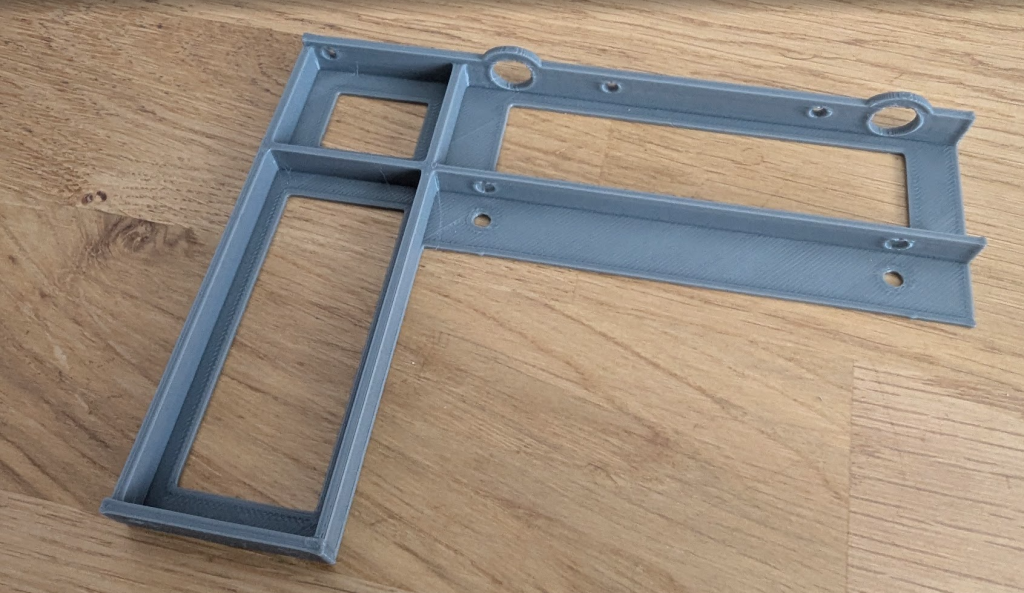
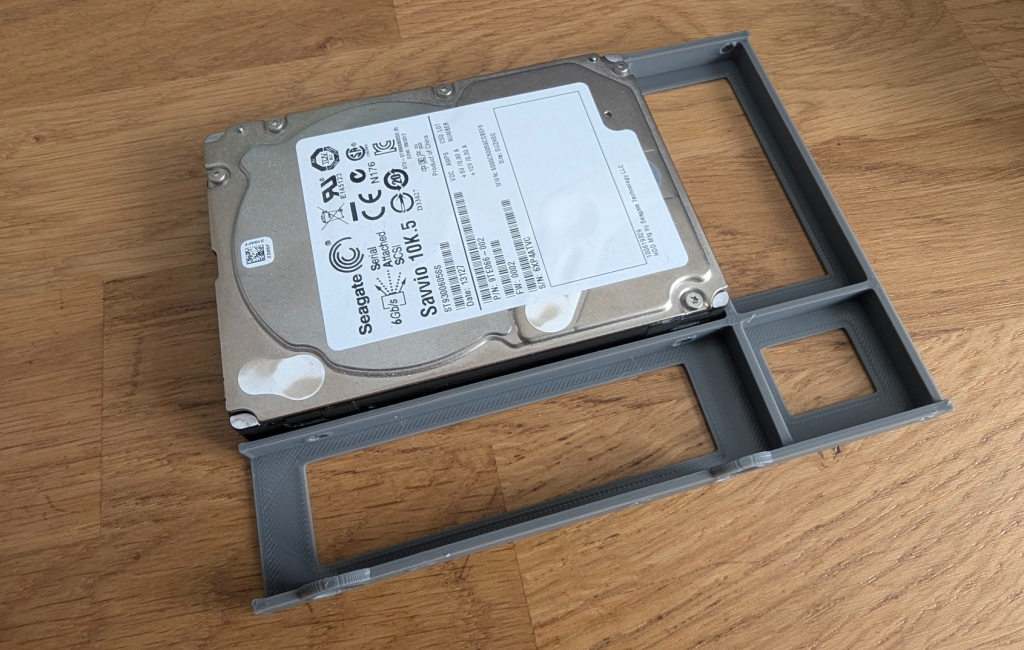
We’ve all experienced that moment of loneliness in our professional careers. The one where you’ve planned the perfect hardware upgrade for your infrastructure, but a trivial detail disrupts the whole operation. Recently, we had to replace the 3.5-inch mechanical drives in one of our 4-node clusters with 2.5-inch SSD drives. A classic maintenance operation to move from hybrid storage to full-flash and gain some IOPS.
The only problem, and a big one: the original server caddies weren’t compatible with this smaller form factor.
First approach: “official” adapters
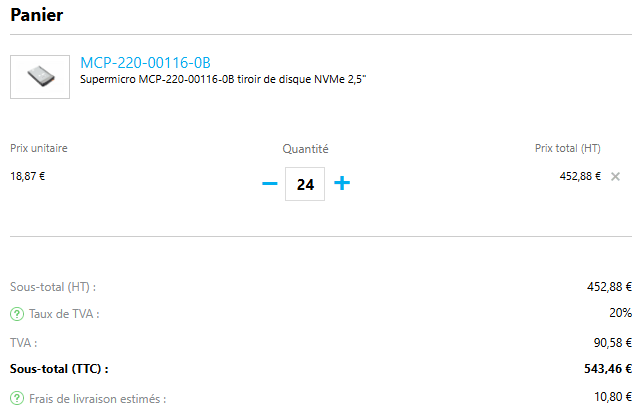
The obvious solution when managing a pro infra? Order official adapters or replacement caddies. We needed 24 pieces in total (6 drives for each of the 4 nodes). And then, reality hit hard.
Over 500 euros (including taxes and shipping).
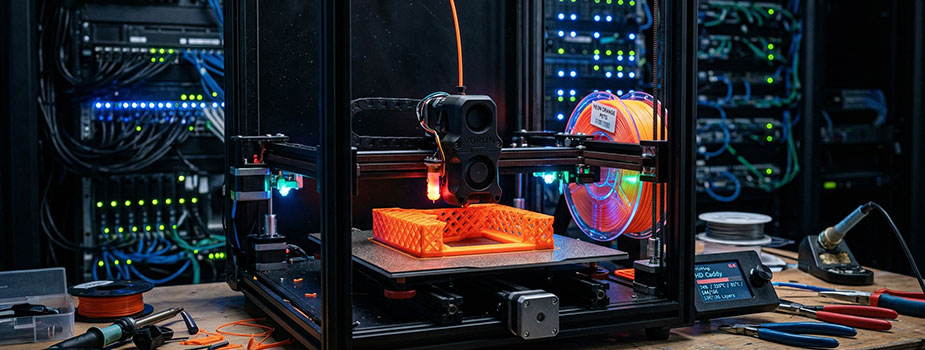
But the worst part wasn’t actually the price: it was the lead time. Waiting several weeks when the project had to move forward? Unthinkable. Since I refused to pay this tax and wait, my 3D printer was going to take care of it.
Plan B: the DIY solution
The advantage of having standard hardware like Supermicro is that you’re never the first to encounter a problem. No need to spend hours on Fusion 360 modeling the part to the nearest millimeter: the open-source community has probably already done it.
To ensure compatibility, I quickly printed one to validate the dimensions and make sure it did the job…
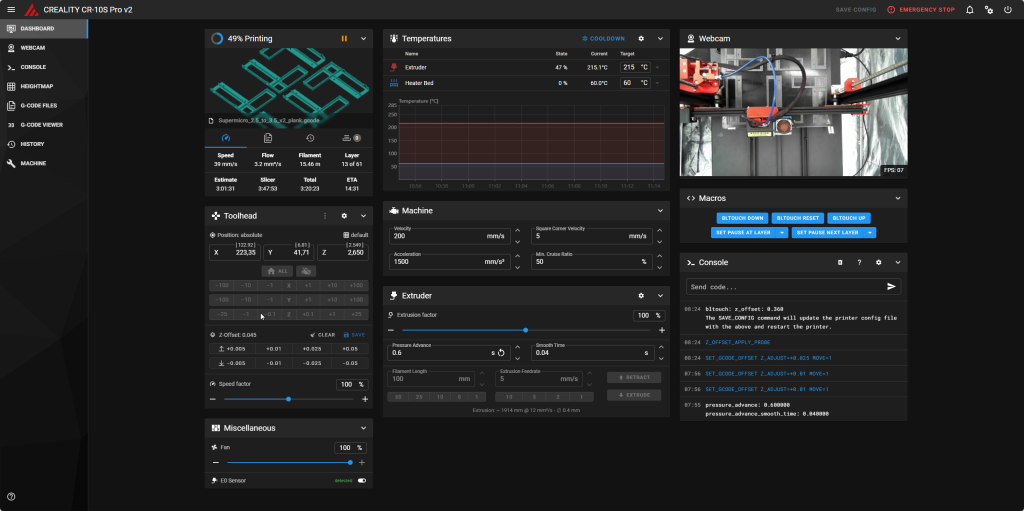
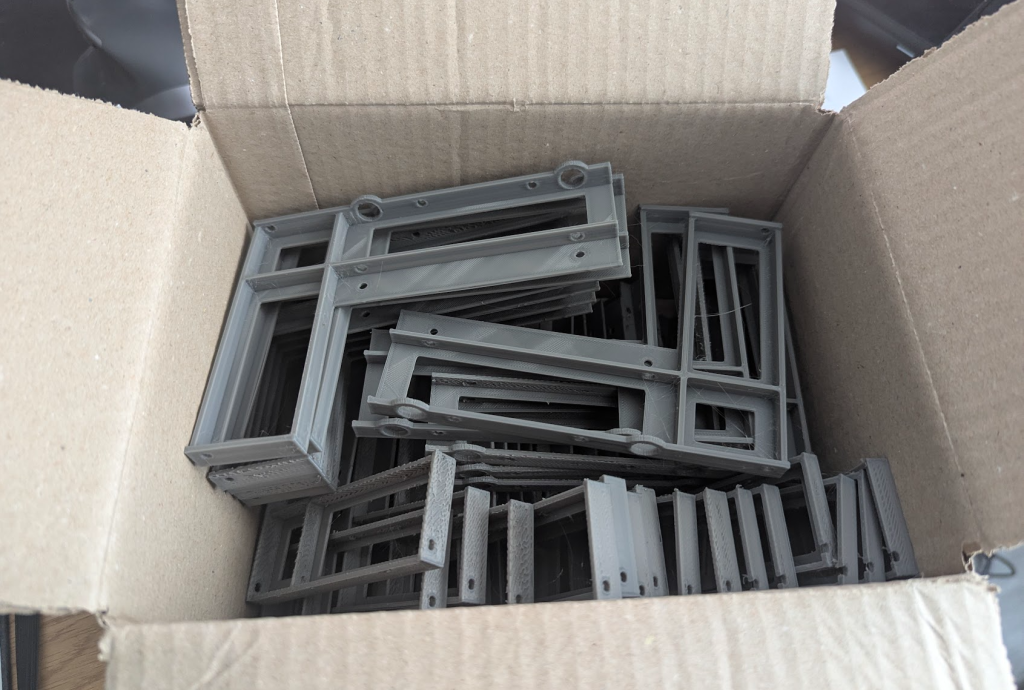
The next step: industrialization. I positioned my models so I could print 6 adapters at once. This meant leaving the printer running for about 7.5 hours for each build plate.
On my Creality CR-10S Pro v2 running Klipper, I was able to monitor the print job to ensure everything went as planned out of the corner of my eye while continuing to work on my projects.
Despite a slight hiccup during the first batch that forced me to do a bit of mechanical tweaking, the prints went perfectly well.
Maker Spirit for the Win!
The final verdict is clear:
Vendor Option: ~€543 and a 3-week wait.
Maker Option: €20 of filament, a few kWh, and two solid days of printing.
Beyond the obvious financial savings (for the price of the official adapters, we could have bought the printer + the filament), the real lesson of this adventure is that the maker mindset allows you to transform a budgetary and temporal problem into a DIY solution that is 20 times cheaper and gets the job done in ultra-short timeframes.
So, the next time a problem rears its head, think “out-of-the-box” and, if need be, whip out your finest spool of filament.
If you read my previous article detailing the architecture and the technical stack I chose to deploy OpenClaw, you already know why I decided to run this solution on my Nutanix AHV cluster. Today, we’re getting practical! I will show you, step by step, how to deploy your own instance on a freshly installed Ubuntu virtual machine.
Before kicking off the hostilities, here is a quick reminder of my setup. I provisioned a VM on Nutanix AHV with:
8 vCPUs
32 GB of RAM
250 GB of storage
an NVIDIA Tesla P4 graphics card in PCI Passthrough
💡 Why favor full Passthrough over vGPU (virtual GPU)? Quite simply to guarantee near “bare-metal” inference performance. By giving our VM direct and exclusive access to the physical hardware, we completely eliminate the overhead (latency) associated with the virtualization layer.
Let’s start the deployment.
Preparing the Ubuntu VM: System and NVIDIA Drivers
The very first step is to prepare the ground to deploy our AI.
Ubuntu 24.04: Operating System Update
This is a rule I apply every single time I deploy a new operating system. As soon as I connect via SSH, I make sure all packages are up to date to avoid future security flaws or dependency conflicts.
sudo apt update && sudo apt upgrade -y
GPU: Installing NVIDIA Drivers
For OpenClaw to harness the computing power of my Tesla P4, the operating system must be able to communicate with it properly. Here are the commands to run to install the drivers (you can access a more detailed guide on the blog):
Once the machine has rebooted, we log back in and type the command to verify that our GPU is properly detected and ready to work:
nvidia-smi
Node.js and OpenClaw
Installing Node.js 22
OpenClaw is built on Node.js. To ensure we have a recent and efficient runtime environment (here version 22), we add the official NodeSource repository before launching the installation:
Once the installation is complete, the system automatically launches the configuration wizard for your instance. I will detail this step as well as the creation of API keys (Discord, Telegram, etc.) in a future blog post.
A small manipulation is required right after the OpenClaw installation if we want to be able to use “openclaw” commands without constraints. We need to add the local installation directory to our PATH environment variable (remember to adapt the username if you are not using administrateur):
💡 Why this manipulation? It’s an excellent security practice that I highly recommend. By exporting the PATH to ~/.npm-global/bin, we avoid installing global NPM packages with root (sudo) privileges. This significantly reduces attack surfaces and saves you from the eternal Linux permission conflicts!
Cleanly Exposing OpenClaw with Caddy
By default, the OpenClaw web interface listens on port 18789. Instead of attacking this port directly, I always prefer to place a reverse proxy in front of my applications. For this lab, my choice fell on Caddy.
sudo apt install -y caddy
💡 Why Caddy rather than Apache or Nginx? Because Caddy is formidably efficient. Where Nginx sometimes requires long configuration blocks for simple proxying, Caddy does the same job in literally three lines of code, all while being ultra-lightweight.
We edit its configuration file:
sudo vi /etc/caddy/Caddyfile
And we replace the entire content with the following instructions (replace the IP with the one of your VM, in my case 192.168.84.134):
192.168.84.134 {
    reverse_proxy 127.0.0.1:18789
}
Now, all that’s left is to restart the service so the proxy takes over:
sudo systemctl restart caddy
Network Security: Locking Down the OpenClaw Instance
Having a functional instance is good, securing it is essential. Even if you are on your local network (LAN), you should never leave open access to your control interface. We are going to apply a strict configuration via the OpenClaw CLI commands.
We start by restricting the Gateway listening to the local loopback to prevent any direct access:
openclaw config set gateway.bind loopback
We then force the operating mode to local, and activate token authentication (the bare minimum):
openclaw config set gateway.mode local
openclaw config set gateway.auth.mode token
Finally, since we are going through Caddy, we must authorize Cross-Origin requests (CORS) coming from our IP address, otherwise the browser will block the page (don’t forget to adapt the IP):
openclaw config set gateway.controlUi.allowedOrigins '["[https://192.168.84.134](https://192.168.84.134)"]'
We restart the service to apply our lockdown:
openclaw gateway restart
💡 The security pattern applied here is akin to local “Zero Trust”. By forcing OpenClaw on the loopback (127.0.0.1), we ensure that absolutely all traffic is forced to go through our Caddy proxy. Coupled with CORS filtering and authentication, we provide a baseline protection for our instance against potential scans or malicious scripts on the network.
First Contact and Configuration Validation
Retrieving the Access Token
Now that the doors are locked, we need the key. The authentication token was automatically generated during installation. We’re going to go fish it directly out of the JSON configuration file:
grep -i token ~/.openclaw/openclaw.json
Carefully copy this string of characters. Then open your browser and access your Web interface (e.g., https://192.168.84.134).
Enter the token in the “Gateway Token” box.
Device Approval
Once connected, you will notice that something is missing: the system is waiting for us to approve the “device” (the PC or tablet from which we wish to use OpenClaw) to grant it the right to process requests.
Return to your terminal to list the pending devices:
openclaw devices list
Locate your device ID in the list (a UUID-type string) and approve it:
💡 Device approval (devices approve) is much more than a simple interface formality. It’s a sort of cryptographic handshake. This mechanism guarantees that no unsolicited machine can attach itself to your OpenClaw cluster instance without your knowledge!
Interaction Tests
The OpenClaw instance is now 100% operational! To validate our entire stack, there’s nothing like a full-scale test. You can send a first prompt on the web interface’s integrated chat, or configure a bridge to send a message on the Discord side.
Conclusion
We went from a simple Ubuntu VM to a true secured inference server, powered by Node.js and accelerated by a dedicated NVIDIA Tesla P4 GPU via Nutanix AHV. The architecture is clean, secured behind a Caddy proxy, and ready to handle our requests.
But this is only the beginning. In upcoming articles, we will go even further: I will show you how to configure OpenClaw via the startup wizard, deploy local models via Ollama, create an interactive Discord bot, and even inject Google API keys to equip our AI with search capabilities. Stay tuned!
We use cookies to improve your experience on our site. By using our site, you consent to cookies.
This website uses cookies
Websites store cookies to enhance functionality and personalise your experience. You can manage your preferences, but blocking some cookies may impact site performance and services.
Essential cookies enable basic functions and are necessary for the proper function of the website.
Name
Description
Duration
Cookie Preferences
This cookie is used to store the user's cookie consent preferences.
30 days
These cookies are needed for adding comments on this website.
Name
Description
Duration
comment_author
Used to track the user across multiple sessions.
Session
comment_author_email
Used to track the user across multiple sessions.
Session
comment_author_url
Used to track the user across multiple sessions.
Session
Statistics cookies collect information anonymously. This information helps us understand how visitors use our website.
Matomo is an open-source web analytics platform that provides detailed insights into website traffic and user behavior.