It’s one of those mornings where the coffee tastes a little different. The taste of major announcements that are bound to change our habits as administrators. Nutanix has just released a trio of major updates into the wild: AOS 7.5, AHV 11.0, and Prism Central 7.5.
Let’s be clear from the start: I’ve combed through the Release Notes for you, and this isn’t just a simple “Patch Tuesday.” It is a structural overhaul. Nutanix is no longer content with just improving its HCI; the vendor is breaking its own dogmas (hello external storage and compute-only nodes) and drastically tightening security, even if it shakes up our old reflexes.
While on paper, the promises of performance (AES everywhere) and flexibility (Elastic Storage) are enticing, my field experience dictates a certain prudence. When you mess with the storage engine and SSH access at the same time, you don’t rush into production without reading the fine print carefully. That is exactly what I’m proposing here: an unfiltered technical analysis of what awaits you.
AOS 7.5: Performance & Architecture
Let’s start with the core of the reactor: AOS 7.5. If you thought the Nutanix storage architecture was set in stone, think again. This version marks a turning point in hot data and disk space management.
The Key Concept: AES Becomes the Absolute Standard
Until now, the Autonomous Extent Store (AES) was often reserved for high-performance All-Flash environments. With 7.5, that’s over: AES becomes the default architecture for all deployments, whether All-Flash or Hybrid.
Why is this important? Because AES improves metadata locality and reduces CPU consumption for I/O. But be careful, the critical novelty here is the automatic migration. If you upgrade an existing hybrid cluster to 7.5, AOS will launch a background conversion task to switch to AES.
Do not underestimate the I/O impact of this “transparent” conversion. Even if Nutanix handles it in the background, metadata restructuring is never trivial on a loaded cluster. Furthermore, Nutanix introduces a revamped Garbage Collection (GC) (“Accelerated Data Reclamation”). It is now capable of cleaning multiple “holes” in an Erasure Coding stripe in a single pass and merging inefficient stripes. It’s brilliant for efficiency, but it confirms that the engine is working much more “intelligently” under the hood.
The Unexpected Opening: Pure Storage and Dense Nodes
This might be the strongest sign of this release: Nutanix is officially opening up to third-party storage. AOS 7.5 supports connecting to Pure Storage FlashArray arrays via NVMeoF/TCP for capacity storage. Nutanix handles the compute, Pure handles the data. For HCI purists like me, this is a paradigm shift, but one that meets a real need for disaggregation.
Finally, for those managing storage monsters, note that existing All-Flash nodes can be upgraded to support up to 185 TB per node, while maintaining aggressive RPOs (NearSync/Sync).
AHV 11.0 & Flexibility: The Era of “Compute-Only” and Elastic Storage
If AOS 7.5 boosts the engine, AHV 11.0 changes the bodywork. For a long time, Nutanix preached the dogma of strict hyperconvergence: “You buy identical nodes, you expand storage and compute at the same time.” With this version, I feel like Nutanix is finally listening to those who, like me, found themselves with too much CPU and not enough disk (or vice versa).
The Key Concept: Official Disaggregation
It’s a small revolution: Nutanix now allows the deployment of “Compute-Only” nodes much more flexibly. We are seeing the arrival of a standalone AHV installer. Concretely, you can manually install AHV via an ISO on a server, without going through the heaviness of a full re-imaging via Foundation.
For labs or rapid compute power expansions, this is a phenomenal time-saver. But be careful, this requires increased rigor regarding hardware compatibility management, as Foundation will no longer be there to act as a safeguard during installation.
The Awaited Feature: Elastic VM Storage
This is undoubtedly the feature I was waiting for the most to break down silos. With Elastic VM Storage, available starting with AHV 11.0 and AOS 7.5, you can finally share a storage container from one AHV cluster to another AHV cluster within the same Prism Central.
Imagine: your Cluster A is bursting at the seams storage-wise, but your Cluster B is sleeping half-empty. Before, you had to move VMs. Now, you can mount the container from Cluster B onto Cluster A and deploy your VMs directly on it.
It’s great, but caution. It’s not magic. You are introducing a critical network dependency between two clusters that were previously isolated. If your inter-cluster network fails, the VMs on Cluster A hosted on Cluster B go down. Moreover, Nutanix clearly states that this allows “serving storage from a remote cluster,” which necessarily implies additional network latency compared to native data locality. Reserve this for workloads that are not sensitive to disk latency or for temporary overflow.
Finally, note the arrival of Dual Stack IPv6. AHV can now talk to your DNS, NTP, and Syslog servers in IPv6. A necessary update to align with modern network standards.
Security and Governance: Locking Everything Down (SSH, vTPM, Profiles)
Let’s move on to the part that will make command-line regulars (myself included) grind their teeth. Nutanix has decided to tighten the screws on security, and they aren’t kidding around.
The Key Concept: The Digital Fortress
The goal is clear: reduce the attack surface, especially against ransomware that often attempts to propagate via lateral movements on management interfaces. Nutanix is therefore introducing mechanisms to limit direct human access to infrastructure components (CVM and Hosts).
The Critical Change: CVM Secure Access (The End of SSH is coming)
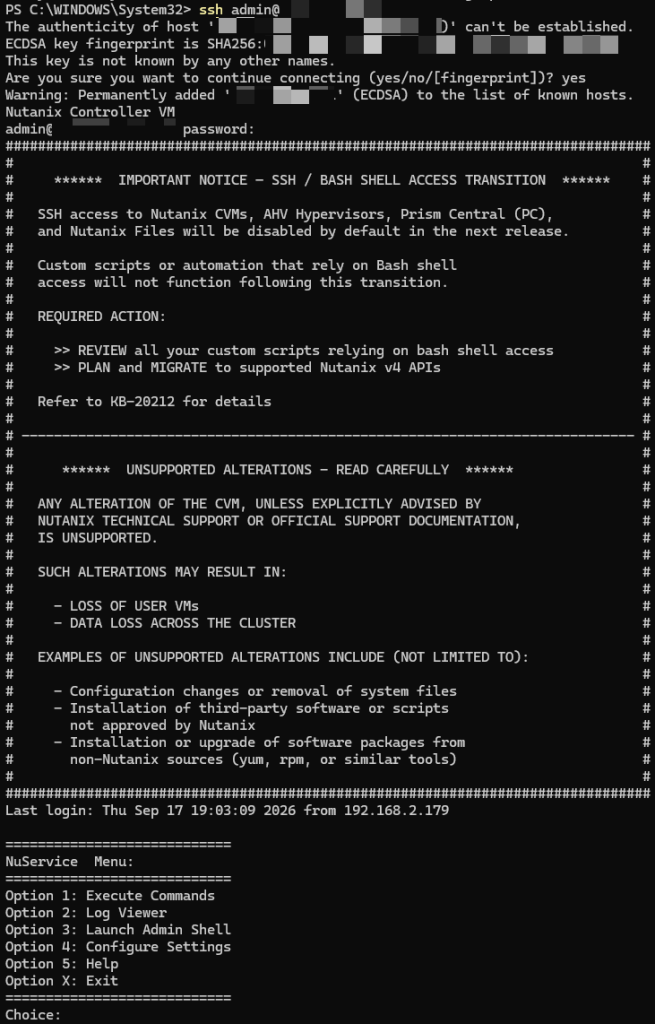
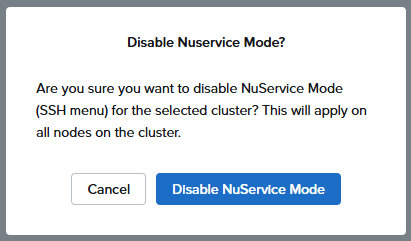
This is the number one vigilance point of this article. With AOS 7.5, you now have the option (and strong incentive) to totally disable SSH access to CVMs and AHV hosts.
On paper, this is excellent for security (“Security by Obscurity”). In operational reality, it is a violent cultural change. No more quick ssh nutanix@cvm to check a log or run a quick diagnostic script. Everything must go through APIs or the console.
Danger Warning! Before checking that “Disable SSH” box, check your migration procedures. The Release Notes are formal: disabling SSH breaks Cross-Cluster Live Migration (CCLM) workflows, whether in On-Demand mode (OD-CCLM) or Disaster Recovery (DR-CCLM). These operations still rely on SSH tunnels between source and destination hosts. If you cut SSH, your migrations will fail. You will have to re-enable SSH to make them work. This is a major operational constraint to anticipate.
Governance: vTPM & Guest Profiles
For highly sensitive environments, AHV now supports storing vTPM encryption keys in an external KMS. This allows centralizing key management and aligning the vTPM security policy with the cluster’s “Data-at-Rest” encryption policy.
On the quality of life side, I welcome the arrival of reusable Guest Customization Profiles. No more tedious copy-pasting of Sysprep scripts with every VM clone. You create a profile (Windows + NGT 4.5 min required), store it, and apply it on the fly to clones or templates. It’s simple, efficient, and avoids input errors.
Prism Central 7.5: The Interface That Makes Life Easier (NIM & Policies)
We finish this overview with Prism Central 7.5 (pc.7.5). If AOS is the engine and AHV the chassis, PC is the dashboard. And believe me, it is fleshing out considerably to save us from ungrateful manual tasks.
The Key Concept: Intelligent Orchestration
The major addition is the arrival of VM Startup Policies. This is a feature I’ve been waiting for for years to replace my cobbled-together startup scripts. Concretely, you can now define the exact restart order of VMs during an HA event (node failure) or a cluster restart.
This allows managing application dependencies cleanly: “Start the Database, wait for it to be UP, then start the Application Server”. It’s native, integrated into the interface, and greatly secures recovery plans.
For large-scale environments, note the appearance of NIM (Nutanix Infrastructure Manager). It is a new orchestrator designed to provision, configure, and manage your datacenters in a standardized way, aligning with the famous “Nutanix Validated Designs” (NVD). It is clearly oriented for very large deployments that want to avoid configuration drift.
Enhanced Resilience: PC Backup & Restore
Until now, restoring a crashed Prism Central could be an adventure, especially if the original cluster was itself down. Nutanix has lifted a major technical constraint: you can now recover a Prism Central instance from a backup located on any Prism Element cluster.
This is a detail that changes everything in case of a total site disaster. Previously, recovery from a Prism Element backup was restricted to the specific cluster where PC was registered. This new flexibility, coupled with the ability to backup to a generic S3 Object Store, makes the management architecture much more robust. We are no longer putting all our eggs in one basket.
Conclusion & Recommendations: Maturity Has a Price
After dissecting these three release notes, my feeling is clear: Nutanix is reaching an impressive level of maturity. The generalization of AES and the opening to external storage show that the platform is ready for the most demanding workloads and the most complex architectures.
However, as a “Prudent Ghost Writer,” I must raise a final red flag before you click “Upgrade.”
⚠️ Watch out for prerequisites: Do not rush headlong into the Prism Central update. Version pc.7.5 requires your Prism Element clusters to run at least AOS 7.0.1.9. If you are on an earlier version, deployment will be blocked. You will have to plan your migration path rigorously.
This is an unavoidable update for the performance and security gains, but it is also a structural update. The AES conversion, the potential SSH deactivation, and the new network dependencies for elastic storage require validating these changes in a pre-production environment.
Take the time to test, check your compatibility matrices, and above all, do not cut SSH before verifying that you do not have any planned inter-cluster migration (CCLM)!
To your keyboards, and happy upgrading!