Those who’ve been following the blog for a while surely remember my “Maxi Best-Of Nutanix CLI” series. I loved writing it, and obviously, it saved the day for some of you more than once. But with the announced end of SSH connections on Nutanix clusters, the days of firing up PuTTY to SSH into a CVM (Controller VM) and typing our ncli or acli commands as we please are over. Today, with the rise of Zero Trust architectures and STIG (Security Technical Implementation Guides) compliance requirements from the US DoD, locking down low-level access is no longer a paranoid option: it’s the production standard.
Why is the API becoming the only master on board?
Let’s be very clear: the REST API is the admin’s essential new Swiss Army knife.
It started with the progressive hardening of our infrastructures, notably with cluster lockdown, but the sentence officially fell in late January 2026: Nutanix announced the End of Support Life (EOSL) for “Bash Shell Access”. The reason is obvious. Leaving direct, unrestricted Bash access to the underlying OS (whether on AOS, AHV, or even Prism Central) has become absolute nonsense when it comes to guaranteeing security, auditability, and long-term support.
Here is the timeline I found in this document:
Under AOS 7.0 to 7.5, we started seeing login warnings, the appearance of an info alert warning of the deactivation of SSH password authentication, and options to disable SSH manually.
Starting from the next major NCI release, Bash will be disabled by default. Instead: an ultra-restricted “SSH Service Menu” allowing you to run a few acli/ncli commands to perform basic troubleshooting / actions.
And for late 2026? The “SSH Service Menu” is in place, the bash shell is disabled, but can be reactivated in “Support-Only” mode via a temporary token provided when handling a ticket with Nutanix support.
The only official, tracked, and complete entry point to interact with the infrastructure via command line is now the API.
Whether it’s the Prism Element API (v2.0) on an isolated cluster, or the Prism Central API (v3/v4) for multi-cluster management, there’s no escaping it: you have to dive in.
The API toolkit
Before we can blast our clusters with API requests, we need to gear up.
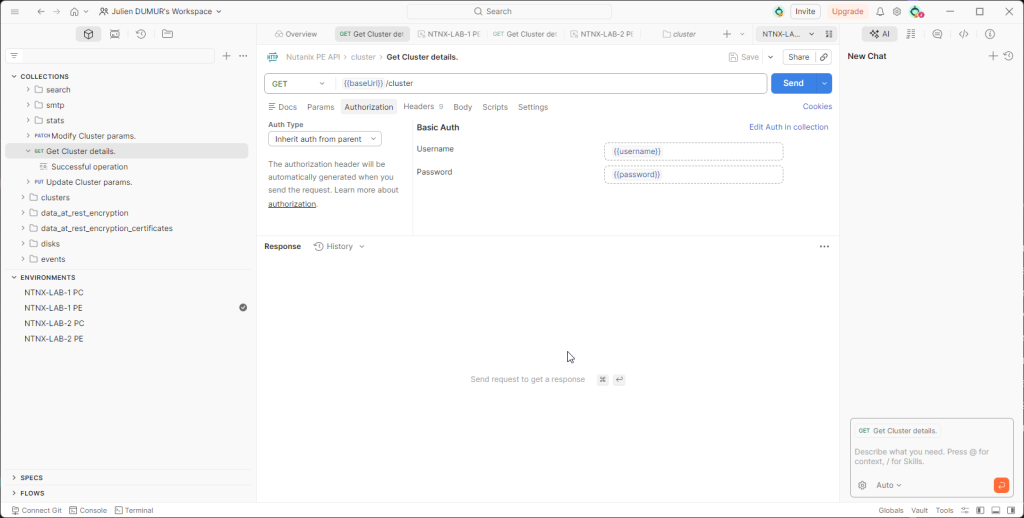
Daily, I switch between two go-to tools: Curl when I have a Linux/WSL terminal at hand (fast, raw, scriptable), and Postman when I need to visually explore Nutanix APIs.
However, even when well-equipped, I regularly see admins tearing their hair out over their first Prism Element requests because of two crucial details.
The SSL certificate: By default, a Prism Element cluster uses a self-signed certificate. If you send a standard request, it will be violently rejected. The field reflex? Always add the -k (or --insecure) flag in your curl commands, and remember to disable the SSL certificate verification option in Postman settings.
Authentication: The Prism Element v2.0 API relies on Basic Auth. Avoid passing your credentials in plain text in the URL of your request (like https://admin:MySuperPass@IP...). It inevitably ends up in plain text in the history or logs. In Postman, use environment variables!
Exploring the API with the built-in REST API Explorer
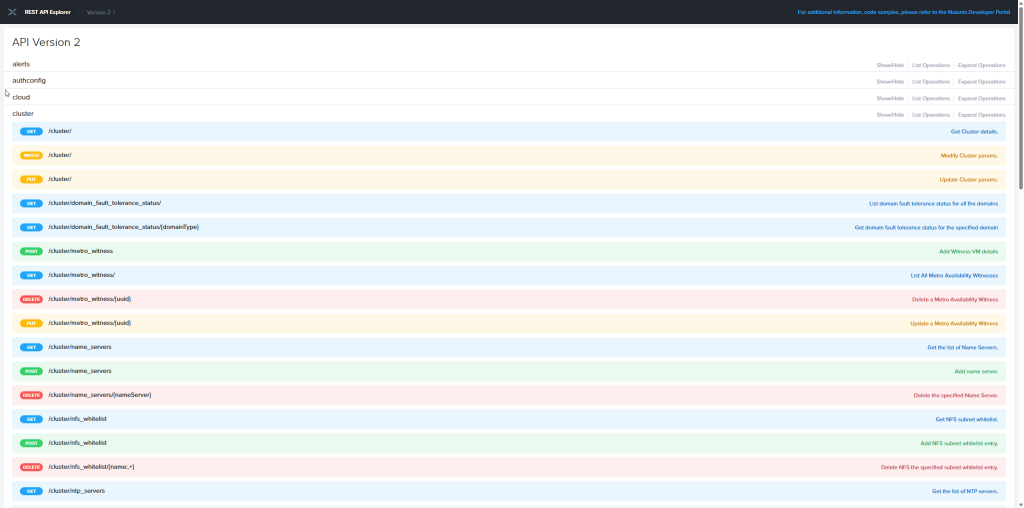
How many times have you banged your head against the wall looking for the right syntax in a 500-page PDF documentation? With Nutanix, forget about that. The best documentation isn’t on the support portal; it’s directly embedded in your cluster.
Prism Element natively integrates an interface called REST API Explorer. To access it, it’s very easy: log in to your cluster’s web interface, click on your username at the top right, then select REST API Explorer. You can also type the URL directly: https://<CVM_IP>:9440/api/nutanix/v2/api_explorer/index.html.
The true power of this Swagger isn’t just listing the endpoints (GET /cluster, POST /vms…). It’s its ability to code for you! Fill in the required fields in the interface and click the “Try it out!” button. Not only does the interface execute the request and display the raw JSON response, but above all, it generates the complete and perfectly formatted curl command. It’s the ultimate hack to save time and avoid syntax errors.
Conclusion
I won’t hide it from you, moving from CLI to REST API took a little effort to adapt. At first, I fumbled around, I grumbled at a malformed header or a temperamental JSON. But once you’ve crossed that milestone, it becomes almost natural. The API opens the doors to large-scale automation and continuous integration. However, you unfortunately won’t be able to find equivalents for every single CLI command…
In the next article of this series, we’re going to get to the heart of the matter. Enough theory, we’ll tackle practice with our first concrete use case: The complete health check of a cluster.
In this new blog post, we’ll cover all the main Nutanix AHV CLI commands that allow you to perform some checks on your virtual machines using the command line.
All the commands in this article can be run via SSH from any CVM in the cluster.
Display the list of virtual machines
To display the list of virtual machines on the Nutanix cluster, simply run the following command:
acli vm.list
This will show you all the VMs present on the cluster, without the CVMs:
nutanix@NTNX-S348084X9211699-B-CVM:192.168.84.22:~$ acli vm.list
VM name VM UUID
LINUX 88699c96-11a5-49ce-9d1d-ac6dfeff913d
NTNX-192-168-84-200-PCVM-1760699089 f659d248-9ece-4aa0-bb0c-22a3b3abbe12
vm_test 9439094a-7b6b-48ca-9821-a01310763886
As you can see, I only have two virtual machines on my cluster:
My Prism Central
A newly deployed “LINUX” virtual machine
A test virtual machine
A handy command to quickly retrieve all virtual machines and their respective UUIDs. Now let’s see how to retrieve information about a specific virtual machine.
Retrieving Virtual Machine Information
To display detailed information about a virtual machine, use the following command:
acli vm.get VM_NAME
Using the example of my “LINUX” virtual machine, this returns the following information:
As you can see, this returns all the information about a virtual machine. It is possible to filter some of the information returned with certain commands. Here are the ones I use most often:
acli vm.disk_get VM_NAME : to retrieve detailed information of all disks of a virtual machine
acli vm.snapshot_list VM_NAME : to retrieve the list of snapshots associated with a virtual machine
nutanix@NTNX-S348084X9211699-B-CVM:192.168.84.22:~$ acli vm.snapshot_list LINUX
Snapshot name Snapshot UUID
SNAPSHOT_BEFORE_UPGRADE e7c1e84e-7087-42fd-9e9e-2b053f0d5714
You now know almost everything about verifying your virtual machines.
In the Maxi Best Of Nutanix CLI series, the previous two articles covered checking the network configuration of a Nutanix cluster and managing subnets.
In this new article, we’ll cover managing storage containers via CLI commands on your Nutanix clusters…
All the commands in this article must be executed from one of the cluster’s CVMs and work on a cluster running AOS 6.10+.
Check the containers
To check the status of your storage containers, the simplest command is:
ncli container list
This command will allow you to display all the information related to all the containers in your cluster.
If you want to display a specific container, you can pass the name (the simplest method) or the ID of your container if you have it as a parameter:
ncli container list name=NAME
ncli container list id=ID
Finally, one last command to display only the usage statistics of your containers:
ncli container list-stats
Renaming a Container
To rename a storage container, it must be completely empty.
Renaming a storage container can be done using the following command:
WARNING: There are two containers created by default when deploying your cluster: “SelfServiceContainer” and “NutanixManagementShare”. Do not attempt to rename them!
Creating a Container
It’s also possible to create storage containers using the CLI:
The “name” and “sp-name” parameters are the only required parameters when running the command. This will allow you to create a base container on the selected storage pool with the following parameters:
No data optimization mechanism
No restrictions/reservations
The default replication factor
But the container creation command can be very useful if you need to create storage containers in batches, for example, if you’re hosting multiple clients on a cluster, each with an allocated amount of storage space!
For example, to create a storage container with the following parameters:
A container with the associated characteristics will then be created:
Modifying Container Settings
An existing container can also be modified. You can modify almost everything in terms of settings, from data optimization mechanisms to reserved/allocated sizes, replication factors, and more.
For all the settings, please refer to the official documentation (link at the bottom of the page).
Deleting a Container
Deleting a container is quite simple, but requires that all files stored within it be deleted or moved first. Deleting a container is done using the following command:
ncli container remove name=NAME
It may happen that despite deleting or moving your VM’s vdisks, the deletion is still refused. This is often due to small residual files.
You must then add the “ignore-small-files” parameter to force the deletion:
WARNING: There are two containers created by default when deploying your cluster: “SelfServiceContainer” and “NutanixManagementShare”. Do not attempt to delete them!
Whether you need to perform specific or repetitive operations, troubleshoot, or gain a more detailed view, the CLI commands for a Nutanix cluster will be your best allies.
In this article, I offer a summary of the best commands for performing all network configuration checks on a Nutanix cluster, whether at the cluster, host, CVM, or virtual machine level.
You must have an AOS 6.10+ cluster to execute some commands of this guide.
A. Using Nutanix acli commands from any CVM in the Nutanix AHV cluster
List the status of the host interfaces:
acli net.list_host_nic 192.168.84.11 @IP_HOST_AHV
Result:
List all vSwitches currently configured on the cluster:
acli net.list_virtual_switch
Result:
You can list the configuration of a particular vSwitch by passing it as an argument to the command:
acli net.list_virtual_switch vs1
List all subnets created on the cluster:
acli net.list
Result:
List the VMs attached to a particular subnet:
acli net.list_vms SUBNET
B. Via the Nutanix manage_ovs script from any CVM in the Nutanix AHV cluster
List the interface status of an AHV host:
manage_ovs show_interfaces
Result:
You can also list the interface status of all hosts in the cluster:
allssh "manage_ovs show_interfaces"
List the status of an AHV host’s uplinks (bonds):
manage_ovs show_uplinks
Result :
You can also list the uplink (bond) status of all AHV hosts in the cluster:
allssh "manage_ovs show_uplinks"
Display LLDP information of an AHV host’s interfaces:
manage_ovs show_lldp
Result:
You can also view LLDP information for the interfaces of all AHV hosts in the cluster:
allssh "manage_ovs show_lldp"
Show currently created bridges on an AHV host:
manage_ovs show_bridges
Result :
You can also view the bridges currently created on all AHV hosts in the cluster:
allssh "manage_ovs show_bridges"
Show the mapping of CVM interfaces to those of AHV hosts:
manage_ovs show_cvm_uplinks_map
Result :
You can also view the interface mapping of CVMs on all AHV hosts in the cluster:
allssh "manage_ovs show_cvm_uplinks_map"
C. Using the Open vSwitch command from any host in a Nutanix AHV cluster
List the existing bridges of an AHV host:
ovs-vsctl list-br
Result :
List all interfaces attached to a particular bridge of an AHV host:
ovs-vsctl list-ifaces br0
Result:
Display the configuration of an AHV host’s port bond:
ovs-vsctl list port br0-up
Result :
Display the configuration and status of a bond on an AHV host:
ovs-appctl bond/show br0-up
Result:
Display information about the status of a LACP-configured bond on an AHV host:
ovs-appctl lacp/show br1-up
Many thanks to Yohan for the article idea and the helping hand!
Here is a quick procedure to install Nutanix Guest Tools manually on your Linux virtual machines (Rocky Linux, RHEL, CentOS…) using the command line.
What are Nutanix Guest Tools?
NGT is a set of software features installed on a virtual machine (VM) and a Nutanix CVM. A Nutanix Guest Agent publishes information about the virtual machine to the Nutanix cluster, such as the guest operating system type, the virtual machine’s mobility status, and the Volume Shadow Copy Service (VSS). The Nutanix Guest Agent is installed on both Windows and Linux guest virtual machines.
Installing Nutanix Guest Tools
Connect to your Nutanix cluster on Prism Central, go to the list of virtual machines, right-click on the virtual machine on which you want to install NGTs, and click “Install NGT”:
On the next screen, in my case no need to change anything, click on “Confirm and Enter Password”:
Don’t touch anything on this screen, just click “Skip and Mount” at the bottom left:
The ISO is mounted, now we move on to the command lines!
The command first returns general information about the cluster (name, ID, UUID, Version, IPs, etc.):
####################################################
# TIMESTAMP : Fri Jul 26 09:07:43 2024 (UTC +0000) #
####################################################
Cluster Name: MiddleEarth
Cluster Id: 585086141872525258
Cluster UUID: 00061c09-6abd-7835-081e-a4bf0150cfca
Cluster Version: 6.5.2
NCC Version: 4.6.6.3-5e8b6399
    CVM ID(Svmid)            : 2
    CVM external IP          : 192.168.2.200
    Hypervisor IP            : 192.168.2.199
    Hypervisor version       : Nutanix 20220304.342
    IPMI IP                  : 192.168.2.139
    Node serial              : BQWL80251503
    Model                    : CommunityEdition
    Node Position            : A
    Block S/N                : e854cc31
Then the command will start to return general information about the cluster, namely the hypervisor, the manufacturer, all the node information (position, host name, manufacturer, model, serial number, etc.), the BIOS and management interface information as well:
Running /hardware_info/show_hardware_info                                                                                                                                                                                                                       [ INFO ]
------------------------------------------------------------------------------------------------------------------------------------------------------------------------------------------------------------------------------------------------------------------------+

Detailed information for show_hardware_info:
Node 192.168.2.200:
INFO:

   --------------------------------------------------------------------------------
   Updated: Thu, 25 Jul 2024 12:54:59 UTC
   Host UUID: 22dd9131-373f-482a-818f-c60b06988a7d
   CVM IP: 192.168.2.200
   Hypervisor Version:el7.nutanix.20220304.342
   NOS Version:el7.3-release-fraser-6.5.2-stable-f2ce4db7d67f495ebfd6208bef9ab0afec9c74af
   NCC Version:4.6.6.3-5e8b6399

   --------------------------------------------------------------------------------

   Nutanix Product Info

   +--------------------------------------------------------------------------------------------------+
   | Manufacturer                  |   Intel Corporation                                              |
   | Product name                  |   CommunityEdition                                               |
   | Product part number           |   CommunityEdition                                               |
   | Configured Serial Number      |   e854cc31                                                       |
   +--------------------------------------------------------------------------------------------------+

   Chassis

   +--------------------------------------------------------------------------------------------------+
   | Bootup state                  |   Safe                                                           |
   | Manufacturer                  |   ...............................                                |
   | Serial number                 |   ..................                                             |
   | Thermal state                 |   Safe                                                           |
   | Version                       |   ..................                                             |
   +--------------------------------------------------------------------------------------------------+

   Node Module

   +--------------------------------------------------------------------------------------------------+
   | Node Position                 |   A                                                              |
   | Bootup state                  |   Safe                                                           |
   | Host name                     |   NTNX-e854cc31-A                                                |
   | Hypervisor type               |   KVM                                                            |
   | Manufacturer                  |   Intel Corporation                                              |
   | Product name                  |   S2600WTTR                                                      |
   | Product part number           |   G92187-372                                                     |
   | Serial number                 |   BQWL80251503                                                   |
   | Thermal state                 |   Safe                                                           |
   | Version                       |   G92187-372                                                     |
   +--------------------------------------------------------------------------------------------------+

   BIOS Information

   +--------------------------------------------------------------------------------------------------+
   | Release date                  |   09/02/2020                                                     |
   | Revision                      |   0.0                                                            |
   | Rom size                      |   16384 KB                                                       |
   | Vendor                        |   Intel Corporation                                              |
   | Version                       |   SE5C610.86B.01.01.1029.090220201031                            |
   +--------------------------------------------------------------------------------------------------+

   BMC

   +--------------------------------------------------------------------------------------------------+
   | Device id                     |   33                                                             |
   | Device available              |   True                                                           |
   | Device revision               |   1                                                              |
   | Firmware revision             |   1.61.1                                                         |
   | Ipmi version                  |   2.0                                                            |
   | Manufacturer                  |   Intel Corporation                                              |
   | Manufacturer id               |   343                                                            |
   | Product id                    |   111 (0x006f)                                                   |
   +--------------------------------------------------------------------------------------------------+
The storage controller is then listed:
Storage Controller

   +--------------------------------------------------------------------------------------------------+
   | Location                      |   ioc0                                                           |
   | Driver name                   |   virtio-pci                                                     |
   | Manufacturer                  |   Red Hat, Inc.                                                  |
   | Status                        |   running                                                        |
   +--------------------------------------------------------------------------------------------------+
   | Location                      |   ioc0                                                           |
   | Driver name                   |   virtio-pci                                                     |
   | Manufacturer                  |   Red Hat, Inc.                                                  |
   | Status                        |   running                                                        |
   +--------------------------------------------------------------------------------------------------+
Then it’s the turn of all the general information on the installed memory:
Physical Memory Array

   +--------------------------------------------------------------------------------------------------+
   | Bank                          |   NODE 1                                                         |
   | Configured slots              |   5                                                              |
   | Max size                      |   384 GB                                                         |
   | Num slots                     |   12                                                             |
   | Total installed size          |   160 GB                                                         |
   +--------------------------------------------------------------------------------------------------+
   | Bank                          |   NODE 2                                                         |
   | Configured slots              |   6                                                              |
   | Max size                      |   384 GB                                                         |
   | Num slots                     |   12                                                             |
   | Total installed size          |   192 GB                                                         |
   +--------------------------------------------------------------------------------------------------+
Then the information concerning the power supplies is displayed:
System Power Supply

   +--------------------------------------------------------------------------------------------------+
   | Location                      |   Pwr Supply 1 FRU (ID 2)                                        |
   | Manufacturer                  |   None                                                           |
   | Max power capacity            |   0.0 W                                                          |
   | Product part number           |   G84027-009                                                     |
   | Revision                      |   None                                                           |
   | Serial number                 |   EXWD80400190                                                   |
   | Status                        |   OK                                                             |
   +--------------------------------------------------------------------------------------------------+
   | Location                      |   Pwr Supply 2 FRU (ID 3)                                        |
   | Manufacturer                  |   None                                                           |
   | Max power capacity            |   0.0 W                                                          |
   | Product part number           |   G84027-009                                                     |
   | Revision                      |   None                                                           |
   | Serial number                 |   EXWD82000830                                                   |
   | Status                        |   OK                                                             |
   +--------------------------------------------------------------------------------------------------+
   | Location                      |   To Be Filled By O.E.M.                                         |
   | Manufacturer                  |   To Be Filled By O.E.M.                                         |
   | Max power capacity            |   0.0 W                                                          |
   | Product part number           |   To Be Filled By O.E.M.                                         |
   | Revision                      |   To Be Filled By O.E.M.                                         |
   | Serial number                 |   To Be Filled By O.E.M.                                         |
   | Status                        |   Unknown                                                        |
   +--------------------------------------------------------------------------------------------------+
Then those concerning the processor(s):
Processor Information

   +--------------------------------------------------------------------------------------------------+
   | Socket designation            |   Socket 1                                                       |
   | Core count                    |   10                                                             |
   | Core enabled                  |   10                                                             |
   | Current speed                 |   2400 MHz                                                       |
   | External clock                |   100 MHz                                                        |
   | Id                            |   0xbfebfbff000406f1L                                            |
   | L1 cache size                 |   640 KB                                                         |
   | L2 cache size                 |   2560 KB                                                        |
   | L3 cache size                 |   25600 KB                                                       |
   | Max speed                     |   4000 MHz                                                       |
   | Status                        |   POPULATED                                                      |
   | Thread count                  |   20                                                             |
   | Type                          |   Central                                                        |
   | Version                       |   Intel(R) Xeon(R) CPU E5-2640 v4 @ 2.40GHz                      |
   | Voltage                       |   1.8 V                                                          |
   +--------------------------------------------------------------------------------------------------+
   | Socket designation            |   Socket 2                                                       |
   | Core count                    |   10                                                             |
   | Core enabled                  |   10                                                             |
   | Current speed                 |   2400 MHz                                                       |
   | External clock                |   100 MHz                                                        |
   | Id                            |   0xbfebfbff000406f1L                                            |
   | L1 cache size                 |   640 KB                                                         |
   | L2 cache size                 |   2560 KB                                                        |
   | L3 cache size                 |   25600 KB                                                       |
   | Max speed                     |   4000 MHz                                                       |
   | Status                        |   POPULATED                                                      |
   | Thread count                  |   20                                                             |
   | Type                          |   Central                                                        |
   | Version                       |   Intel(R) Xeon(R) CPU E5-2640 v4 @ 2.40GHz                      |
   | Voltage                       |   1.8 V                                                          |
   +--------------------------------------------------------------------------------------------------+
Next comes the detailed information for each installed RAM unit:
Memory Module
+--------------------------------------------------------------------------------------------------+
| Location | DIMM_A1 |
| Bank connection | NODE 1 |
| Capable speed | 2667.000000 MHz |
| Current speed | 2134 MHz |
| Installed size | 32768 MB |
| Manufacturer | Samsung |
| Product part number | M393A4K40CB2-CTD |
| Serial number | 401EA4F9 |
| Type | DDR4 |
+--------------------------------------------------------------------------------------------------+
| Location | DIMM_A2 |
| Bank connection | NODE 1 |
| Capable speed | 2667.000000 MHz |
| Current speed | 2134 MHz |
| Installed size | 32768 MB |
| Manufacturer | Samsung |
| Product part number | M393A4K40CB2-CTD |
| Serial number | 401E96DC |
| Type | DDR4 |
+--------------------------------------------------------------------------------------------------+
| Location | DIMM_B1 |
| Bank connection | NODE 1 |
| Capable speed | 2667.000000 MHz |
| Current speed | 2134 MHz |
| Installed size | 32768 MB |
| Manufacturer | Samsung |
| Product part number | M393A4K40CB2-CTD |
| Serial number | 401E97B9 |
| Type | DDR4 |
+--------------------------------------------------------------------------------------------------+
| Location | DIMM_B2 |
| Bank connection | NODE 1 |
| Capable speed | 2667.000000 MHz |
| Current speed | 2134 MHz |
| Installed size | 32768 MB |
| Manufacturer | Samsung |
| Product part number | M393A4K40CB2-CTD |
| Serial number | 401EA624 |
| Type | DDR4 |
+--------------------------------------------------------------------------------------------------+
| Location | DIMM_C1 |
| Bank connection | NODE 1 |
| Capable speed | 2667.000000 MHz |
| Current speed | 2134 MHz |
| Installed size | 32768 MB |
| Manufacturer | Samsung |
| Product part number | M393A4K40CB2-CTD |
| Serial number | 401EA4AB |
| Type | DDR4 |
+--------------------------------------------------------------------------------------------------+
| Location | DIMM_E1 |
| Bank connection | NODE 2 |
| Capable speed | 2667.000000 MHz |
| Current speed | 2134 MHz |
| Installed size | 32768 MB |
| Manufacturer | Samsung |
| Product part number | M393A4K40CB2-CTD |
| Serial number | 401EA625 |
| Type | DDR4 |
+--------------------------------------------------------------------------------------------------+
| Location | DIMM_E2 |
| Bank connection | NODE 2 |
| Capable speed | 2667.000000 MHz |
| Current speed | 2134 MHz |
| Installed size | 32768 MB |
| Manufacturer | Samsung |
| Product part number | M393A4K40CB2-CTD |
| Serial number | 401E97AC |
| Type | DDR4 |
+--------------------------------------------------------------------------------------------------+
| Location | DIMM_F1 |
| Bank connection | NODE 2 |
| Capable speed | 2667.000000 MHz |
| Current speed | 2134 MHz |
| Installed size | 32768 MB |
| Manufacturer | Samsung |
| Product part number | M393A4K40CB2-CTD |
| Serial number | 401EA591 |
| Type | DDR4 |
+--------------------------------------------------------------------------------------------------+
| Location | DIMM_F2 |
| Bank connection | NODE 2 |
| Capable speed | 2667.000000 MHz |
| Current speed | 2134 MHz |
| Installed size | 32768 MB |
| Manufacturer | Samsung |
| Product part number | M393A4K40CB2-CTD |
| Serial number | 401EA5D8 |
| Type | DDR4 |
+--------------------------------------------------------------------------------------------------+
| Location | DIMM_G1 |
| Bank connection | NODE 2 |
| Capable speed | 2667.000000 MHz |
| Current speed | 2134 MHz |
| Installed size | 32768 MB |
| Manufacturer | Samsung |
| Product part number | M393A4K40CB2-CTD |
| Serial number | 401EA1E7 |
| Type | DDR4 |
+--------------------------------------------------------------------------------------------------+
| Location | DIMM_H1 |
| Bank connection | NODE 2 |
| Capable speed | 2667.000000 MHz |
| Current speed | 2134 MHz |
| Installed size | 32768 MB |
| Manufacturer | Samsung |
| Product part number | M393A4K40CB2-CTD |
| Serial number | 401EA4A9 |
| Type | DDR4 |
+--------------------------------------------------------------------------------------------------+
Then the information concerning the installed network cards:
NIC

   +--------------------------------------------------------------------------------------------------+
   | Location                      |   eth0                                                           |
   | Device name                   |   eth0                                                           |
   | Driver name                   |   ixgbe                                                          |
   | Firmware version              |   0x800004f8                                                     |
   | Mac address                   |   a4:bf:01:50:cf:ca                                              |
   | Manufacturer                  |   Intel Corporation(8086)                                        |
   | Product name                  |   Ethernet Controller 10-Gigabit X540-AT2(1528)                  |
   | Sub device                    |   Subsystem device 35c5(35c5)                                    |
   | Sub vendor                    |   Intel Corporation(8086)                                        |
   | Driver Version                |   5.16.5                                                         |
   +--------------------------------------------------------------------------------------------------+
   | Location                      |   eth1                                                           |
   | Device name                   |   eth1                                                           |
   | Driver name                   |   ixgbe                                                          |
   | Firmware version              |   0x800004f8                                                     |
   | Mac address                   |   a4:bf:01:50:cf:cb                                              |
   | Manufacturer                  |   Intel Corporation(8086)                                        |
   | Product name                  |   Ethernet Controller 10-Gigabit X540-AT2(1528)                  |
   | Sub device                    |   Subsystem device 35c5(35c5)                                    |
   | Sub vendor                    |   Intel Corporation(8086)                                        |
   | Driver Version                |   5.16.5                                                         |
   +--------------------------------------------------------------------------------------------------+
All installed storage disks, HDD and SSD, are then displayed:
SSD
+--------------------------------------------------------------------------------------------------+
| Capacity | 120.0 GB |
| Firmware version | 2.22 |
| Hypervisor disk | True |
| Power on hours | 0 |
| Product part number | OCZ-AGILITY3 |
| Secured boot disk | False |
| Serial number | OCZ-6F95UNJ029ACBIFD |
| Smartctl status | PASSED |
+--------------------------------------------------------------------------------------------------+
| Capacity | 800.0 GB |
| Firmware version | C925 |
| Hypervisor disk | True |
| Manufacturer | WDC |
| Power on hours | 0 |
| Product part number | WUSTR6480ASS204 |
| Secured boot disk | False |
| Serial number | V6V2TU8A |
| Smartctl status | OK |
+--------------------------------------------------------------------------------------------------+
| Location | 5 |
| Capacity | 500.0 GB |
| Firmware version | RVT04B6Q |
| Hypervisor disk | True |
| Power on hours | 3921 |
| Product part number | Samsung SSD 860 EVO 500GB |
| Secured boot disk | False |
| Serial number | S4CNNX0N803693N |
| Smartctl status | PASSED |
+--------------------------------------------------------------------------------------------------+
| Location | 6 |
| Capacity | 800.0 GB |
| Firmware version | C925 |
| Hypervisor disk | True |
| Manufacturer | WDC |
| Power on hours | 0 |
| Product part number | WUSTR6480ASS204 |
| Secured boot disk | False |
| Serial number | V6V2PDUA |
| Smartctl status | OK |
+--------------------------------------------------------------------------------------------------+
| Location | 8 |
| Capacity | 800.0 GB |
| Firmware version | C925 |
| Hypervisor disk | True |
| Manufacturer | WDC |
| Power on hours | 0 |
| Product part number | WUSTR6480ASS204 |
| Secured boot disk | False |
| Serial number | V6V2U2TA |
| Smartctl status | OK |
+--------------------------------------------------------------------------------------------------+
| Location | 9 |
| Capacity | 800.0 GB |
| Firmware version | C925 |
| Hypervisor disk | True |
| Manufacturer | WDC |
| Power on hours | 0 |
| Product part number | WUSTR6480ASS204 |
| Secured boot disk | False |
| Serial number | V6V2SYZA |
| Smartctl status | OK |
+--------------------------------------------------------------------------------------------------+
| Location | 10 |
| Capacity | 500.0 GB |
| Firmware version | RVT04B6Q |
| Hypervisor disk | True |
| Power on hours | 3926 |
| Product part number | Samsung SSD 860 EVO 500GB |
| Secured boot disk | False |
| Serial number | S4CNNX0N803688F |
| Smartctl status | PASSED |
+--------------------------------------------------------------------------------------------------+
| Location | 12 |
| Capacity | 800.0 GB |
| Firmware version | C925 |
| Hypervisor disk | True |
| Manufacturer | WDC |
| Power on hours | 0 |
| Product part number | WUSTR6480ASS204 |
| Secured boot disk | False |
| Serial number | V6V2L6LA |
| Smartctl status | OK |
+--------------------------------------------------------------------------------------------------+
HDD
+--------------------------------------------------------------------------------------------------+
| Capacity | 1800.0 GB |
| Firmware version | C004 |
| Hypervisor disk | True |
| Manufacturer | SEAGATE |
| Power on hours | 0 |
| Product part number | ST1800MM0129 |
| Rotation rate | 10500 rpm |
| Secured boot disk | False |
| Serial number | WBN3AW060000C036516V |
| Smartctl status | OK |
+--------------------------------------------------------------------------------------------------+
| Capacity | 1800.0 GB |
| Firmware version | C003 |
| Hypervisor disk | True |
| Manufacturer | SEAGATE |
| Power on hours | 0 |
| Product part number | ST1800MM0129 |
| Rotation rate | 10500 rpm |
| Secured boot disk | False |
| Serial number | WBN1FVRH0000K9277TAC |
| Smartctl status | OK |
+--------------------------------------------------------------------------------------------------+
| Capacity | 1800.0 GB |
| Firmware version | C003 |
| Hypervisor disk | True |
| Manufacturer | SEAGATE |
| Power on hours | 0 |
| Product part number | ST1800MM0129 |
| Rotation rate | 10500 rpm |
| Secured boot disk | False |
| Serial number | WBN1B7QZ0000K923B2PF |
| Smartctl status | OK |
+--------------------------------------------------------------------------------------------------+
| Capacity | 1800.0 GB |
| Firmware version | None |
| Hypervisor disk | False |
| Manufacturer | Seagate |
| Power on hours | 0 |
| Product part number | ST1800MM0129 |
| Rotation rate | 0 rpm |
| Secured boot disk | False |
| Serial number | None |
+--------------------------------------------------------------------------------------------------+
| Capacity | 500.0 GB |
| Firmware version | None |
| Hypervisor disk | False |
| Power on hours | 0 |
| Product part number | Samsung SSD 860 |
| Rotation rate | 0 rpm |
| Secured boot disk | False |
| Serial number | None |
+--------------------------------------------------------------------------------------------------+
| Capacity | 1800.0 GB |
| Firmware version | None |
| Hypervisor disk | False |
| Manufacturer | Seagate |
| Power on hours | 0 |
| Product part number | ST1800MM0129 |
| Rotation rate | 0 rpm |
| Secured boot disk | False |
| Serial number | None |
+--------------------------------------------------------------------------------------------------+
| Capacity | 1800.0 GB |
| Firmware version | None |
| Hypervisor disk | False |
| Manufacturer | Seagate |
| Power on hours | 0 |
| Product part number | ST1800MM0129 |
| Rotation rate | 0 rpm |
| Secured boot disk | False |
| Serial number | None |
+--------------------------------------------------------------------------------------------------+
| Capacity | 1800.0 GB |
| Firmware version | None |
| Hypervisor disk | False |
| Manufacturer | Seagate |
| Power on hours | 0 |
| Product part number | ST1800MM0129 |
| Rotation rate | 0 rpm |
| Secured boot disk | False |
| Serial number | None |
+--------------------------------------------------------------------------------------------------+
| Capacity | 1800.0 GB |
| Firmware version | None |
| Hypervisor disk | False |
| Manufacturer | Seagate |
| Power on hours | 0 |
| Product part number | ST1800MM0129 |
| Rotation rate | 0 rpm |
| Secured boot disk | False |
| Serial number | None |
+--------------------------------------------------------------------------------------------------+
| Capacity | 800.0 GB |
| Firmware version | None |
| Hypervisor disk | False |
| Power on hours | 0 |
| Product part number | WUSTR6480ASS204 |
| Rotation rate | 0 rpm |
| Secured boot disk | False |
| Serial number | None |
+--------------------------------------------------------------------------------------------------+
| Capacity | 500.0 GB |
| Firmware version | None |
| Hypervisor disk | False |
| Power on hours | 0 |
| Product part number | Samsung SSD 860 |
| Rotation rate | 0 rpm |
| Secured boot disk | False |
| Serial number | None |
+--------------------------------------------------------------------------------------------------+
| Capacity | 800.0 GB |
| Firmware version | None |
| Hypervisor disk | False |
| Power on hours | 0 |
| Product part number | WUSTR6480ASS204 |
| Rotation rate | 0 rpm |
| Secured boot disk | False |
| Serial number | None |
+--------------------------------------------------------------------------------------------------+
| Capacity | 800.0 GB |
| Firmware version | None |
| Hypervisor disk | False |
| Power on hours | 0 |
| Product part number | WUSTR6480ASS204 |
| Rotation rate | 0 rpm |
| Secured boot disk | False |
| Serial number | None |
+--------------------------------------------------------------------------------------------------+
| Capacity | 1800.0 GB |
| Firmware version | C003 |
| Hypervisor disk | True |
| Manufacturer | SEAGATE |
| Power on hours | 0 |
| Product part number | ST1800MM0129 |
| Rotation rate | 10500 rpm |
| Secured boot disk | False |
| Serial number | WBN1EH950000K93000FK |
| Smartctl status | OK |
+--------------------------------------------------------------------------------------------------+
| Capacity | 800.0 GB |
| Firmware version | None |
| Hypervisor disk | False |
| Power on hours | 0 |
| Product part number | WUSTR6480ASS204 |
| Rotation rate | 0 rpm |
| Secured boot disk | False |
| Serial number | None |
+--------------------------------------------------------------------------------------------------+
| Capacity | 1800.0 GB |
| Firmware version | None |
| Hypervisor disk | False |
| Manufacturer | Seagate |
| Power on hours | 0 |
| Product part number | ST1800MM0129 |
| Rotation rate | 0 rpm |
| Secured boot disk | False |
| Serial number | None |
+--------------------------------------------------------------------------------------------------+
| Capacity | 1800.0 GB |
| Firmware version | C001 |
| Hypervisor disk | True |
| Manufacturer | SEAGATE |
| Power on hours | 0 |
| Product part number | ST1800MM0129 |
| Rotation rate | 10500 rpm |
| Secured boot disk | False |
| Serial number | WBN00K6G0000E802B5B0 |
| Smartctl status | OK |
+--------------------------------------------------------------------------------------------------+
| Capacity | 1800.0 GB |
| Firmware version | C003 |
| Hypervisor disk | True |
| Manufacturer | SEAGATE |
| Power on hours | 0 |
| Product part number | ST1800MM0129 |
| Rotation rate | 10500 rpm |
| Secured boot disk | False |
| Serial number | WBN0DZLT0000E837B2FX |
| Smartctl status | OK |
+--------------------------------------------------------------------------------------------------+
And finally, information regarding the GPU(s) possibly installed with residual details regarding the logs displayed:
GPU

   +--------------------------------------------------------------------------------------------------+
   | Class                         |   Display controller:VGA compatible controller:VGA controller    |
   | Device                        |   MGA G200e [Pilot] ServerEngines (SEP1)                         |
   | Revision                      |   5                                                              |
   | Slot                          |   0000:08:00.0                                                   |
   | Sub device                    |   Subsystem device 0103                                          |
   | Sub vendor                    |   Intel Corporation                                              |
   | Vendor                        |   Matrox Electronics Systems Ltd.                                |
   +--------------------------------------------------------------------------------------------------+

INFO: Hardware Info log file can be found at : /home/nutanix/data/hardware_logs

INFO: NuCollector output written to: /home/nutanix/data/hardware_logs/192.168.2.200_output
INFO: The command to verify the output is: cd /home/nutanix/data/hardware_logs && sha224sum -c output.checksum

Refer to KB 7084 (http://portal.nutanix.com/kb/7084) for details on show_hardware_info or Recheck with: ncc hardware_info show_hardware_info
+-----------------------+
| State         | Count |
+-----------------------+
| Info          | 1     |
| Total Plugins | 1     |
+-----------------------+
Plugin output written to /home/nutanix/data/logs/ncc-output-latest.log
This command is really useful for quickly exporting an exhaustive list of the entire hardware configuration of your cluster, especially if it is necessary to check compatibility or to transmit the information to support if this proves necessary.
An SSH access is a privileged entry point for hackers. Today I am offering you a guide that will allow you to strengthen the security of your SSH accesses, to reduce the attack surface, in order to make them much more difficult to attack.
We use cookies to improve your experience on our site. By using our site, you consent to cookies.
This website uses cookies
Websites store cookies to enhance functionality and personalise your experience. You can manage your preferences, but blocking some cookies may impact site performance and services.
Essential cookies enable basic functions and are necessary for the proper function of the website.
Name
Description
Duration
Cookie Preferences
This cookie is used to store the user's cookie consent preferences.
30 days
These cookies are needed for adding comments on this website.
Name
Description
Duration
comment_author
Used to track the user across multiple sessions.
Session
comment_author_email
Used to track the user across multiple sessions.
Session
comment_author_url
Used to track the user across multiple sessions.
Session
Statistics cookies collect information anonymously. This information helps us understand how visitors use our website.
Matomo is an open-source web analytics platform that provides detailed insights into website traffic and user behavior.