
Nutanix AOS 7.6, AHV 11.2 and PC 7.6: upgrade report

The change I enjoyed the most while moving our production clusters and my homelab to the Nutanix AOS 7.6 upgrade takes two keystrokes: copy and paste finally works in the virtual machine console. It is far from the most significant part of this release, which mostly reshapes SSH access to the CVMs and turns Prism Central 7.6 into a much steadier version than 7.3 and 7.5 were at launch.
We started from AOS 7.5.1.8 and AHV 11.0.1.8 and landed on AOS 7.6.0.6, AHV 11.2.0.2 and Prism Central pc.7.6.0.6, across several production clusters hosted at OVHcloud and on the Supermicro 5019D-FN8TP node of my homelab (8 cores, 128 GB of RAM, 2 TB raw).
For that node, no Foundation on unsupported hardware like last year: I went through Nutanix CE this time. I covered the previous release in my article on AOS 7.5 and AHV 11.0.
Upgrading to AOS 7.6.0.6: order and rollout
I followed the order Nutanix recommends, the one I detail in my article on LCM: Prism Central first, then AOS, then AHV. On the production clusters everything went through LCM with the versions it offered that day, and I timed nothing: I start the job and let it live its own life.
On the homelab I had to download the files and upload them to the cluster before I could start the upgrade, on the same principle as for Prism Central 2024.2.
After the upgrade, the LCM inventory shows the following versions:
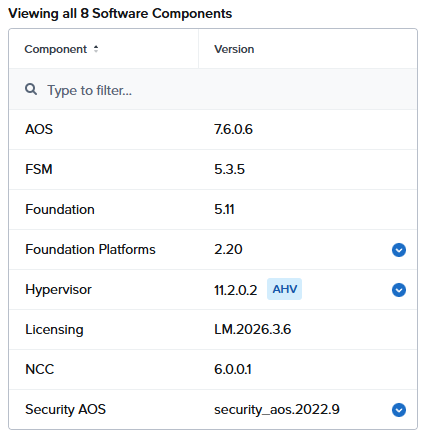
Taking the 7.6.0.6 that LCM offered instead of the initial 7.6 matters more than it looks. That patch clears two known blockers of 7.6: an AOS upgrade that freezes and never progresses (KB-22340), and a host stuck in “EnteringMaintenance” during the move to AHV 11.2 because the Narsil service keeps restarting. On the Prism Central side, pc.7.6.0.6 also fixes the login failures that could lock you out of the web console while upgrading from pc.7.3 or later.
The “Inconsistent Virtual Switch” alert after the upgrade
The only real snag of the whole operation: on two or three of our clusters, Prism raised an “Inconsistent Virtual Switch” alert once the upgrade was over. Nutanix documents it as a known issue of AOS 7.6, still open in 7.6.0.6: the VLAN configured on the AHV host bridge port no longer matches the one AOS stored for the virtual switch (KB-22397).
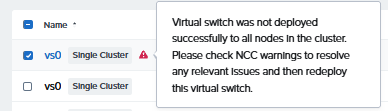
The same alert also shows up in the list of issues fixed by 7.6, for a different cause, an MTU mismatch between the hosts’ br0 bridge and the virtual switch. One variant goes away, another arrives. We fixed them.
Prism Central 7.6, steady at last
On our side, in production as well as on the homelab, pc.7.6.0.6 carries far fewer bugs than the first versions of 7.3 and 7.5 did. Two things are still worth checking before you start the upgrade.
First: pc.7.6 automatically moves every existing entity without a project into a system project, the “Default Project”, and that migration cannot be rolled back. Second: Nutanix Kubernetes Engine is not compatible with pc.7.6, so you need to move your workloads to NKP beforehand. Good news on the other hand, the local admin account lockout every ten minutes reported in pc.7.6 (KB-22348) no longer appears in the known issues of pc.7.6.0.6.
Copy and paste in the VM console
This one is my favourite of the release! Pasting a long password or a license key into a virtual machine console, instead of typing it character by character, now works from the console launched by Prism Central:
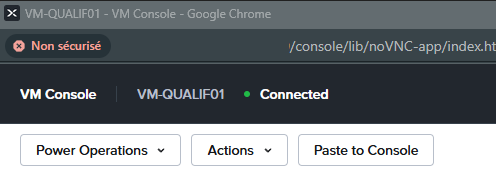
You will need both AHV 11.2 and pc.7.6: a cluster left on AHV 11.0 behind an up-to-date Prism Central gets nothing. On a related note, the “Console” tab of a VM is deprecated in Prism Central, the workflow now goes through the “Launch Console” action.
Secure Access and the end of direct SSH
With Secure Access, the admin user who connects over SSH to a CVM no longer lands on a bash prompt: the session opens the NuService Menu, a restricted shell that runs allow-listed commands on the CVM or the AHV host, shows the cluster logs, opens a bash session (admin shell) and manages local LDAP authentication. It is surprising at first, and I have not needed to type a single command in it yet.
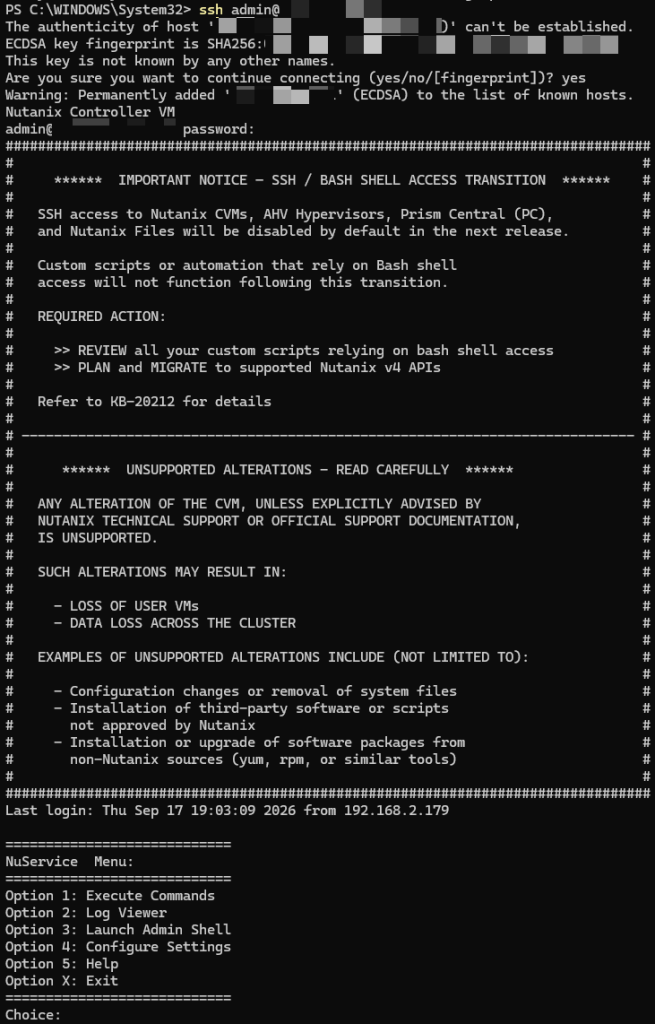
The nutanix user, for its part, keeps a regular bash session. For support work, the “Support-only Login” requires a token exchange with Nutanix and opens bash access for a 72-hour window. External SSH access is turned on or off cluster by cluster from Prism Central, through the “NuService Mode”, with a confirmation prompt on every switch:
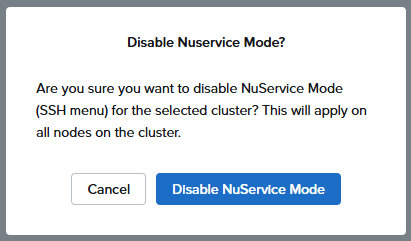
On the host side, AHV 11.2 closes external SSH access on port 22 by default: you go through the CVM to reach the host, and the external SSH setting now applies to the CVMs only. What I described in The end of SSH on Nutanix keeps coming true release after release.
One last change under the hood: the CVM and the Prism Central VM now run on RHEL 9, aligned with the RHEL 9 STIG hardening guide. Day to day, it makes very little difference.
What I have not tested yet
Several notable features of this release are still waiting for me to try them, so I am simply listing them:
- Cluster fault tolerance: the new 1N/2D mode (one node or two disks), and 1N&1D now possible beyond three nodes, with conversion from Prism Central.
- Cluster expansion: moving an AHV cluster from two to three nodes.
- Live migration across clusters: from an older AHV version to a newer one, with a choice of destination storage.
- BIOS UUID: preserved through failover and restore, so third-party backup software keeps its chain intact.
- Memory metrics: ballooned memory is now reported separately from what the VMs really consume.
- Capacity per node: 307 TB on all-flash NVMe against 185 TB before, only for new deployments that start on 7.6. An upgraded cluster keeps its former limits.
Planning ahead: the end of the legacy APIs
API versions v0.8, v1, v2 and v3 lose support with the AOS and Prism Central release planned for Q2 2027. The first effect is visible in pc.7.6 already: Nutanix Guest Tools actions move to v4 permissions, and custom roles built on v3 permissions have to be updated. If your scripts still talk to the v2 or v3 APIs, you have less than a year to move them to the v4 APIs…
Now you know everything, all that is left is to launch your LCM upgrades!
0 comments