
The End of SSH on Nutanix: An Inevitable Shift to APIs

Those who’ve been following the blog for a while surely remember my “Maxi Best-Of Nutanix CLI” series. I loved writing it, and obviously, it saved the day for some of you more than once. But with the announced end of SSH connections on Nutanix clusters, the days of firing up PuTTY to SSH into a CVM (Controller VM) and typing our ncli or acli commands as we please are over. Today, with the rise of Zero Trust architectures and STIG (Security Technical Implementation Guides) compliance requirements from the US DoD, locking down low-level access is no longer a paranoid option: it’s the production standard.
Why is the API becoming the only master on board?
Let’s be very clear: the REST API is the admin’s essential new Swiss Army knife.
It started with the progressive hardening of our infrastructures, notably with cluster lockdown, but the sentence officially fell in late January 2026: Nutanix announced the End of Support Life (EOSL) for “Bash Shell Access”. The reason is obvious. Leaving direct, unrestricted Bash access to the underlying OS (whether on AOS, AHV, or even Prism Central) has become absolute nonsense when it comes to guaranteeing security, auditability, and long-term support.
Here is the timeline I found in this document:
- Under AOS 7.0 to 7.5, we started seeing login warnings, the appearance of an info alert warning of the deactivation of SSH password authentication, and options to disable SSH manually.
- Starting from the next major NCI release, Bash will be disabled by default. Instead: an ultra-restricted “SSH Service Menu” allowing you to run a few
acli/nclicommands to perform basic troubleshooting / actions. - And for late 2026? The “SSH Service Menu” is in place, the bash shell is disabled, but can be reactivated in “Support-Only” mode via a temporary token provided when handling a ticket with Nutanix support.
The only official, tracked, and complete entry point to interact with the infrastructure via command line is now the API.
Whether it’s the Prism Element API (v2.0) on an isolated cluster, or the Prism Central API (v3/v4) for multi-cluster management, there’s no escaping it: you have to dive in.
The API toolkit
Before we can blast our clusters with API requests, we need to gear up.
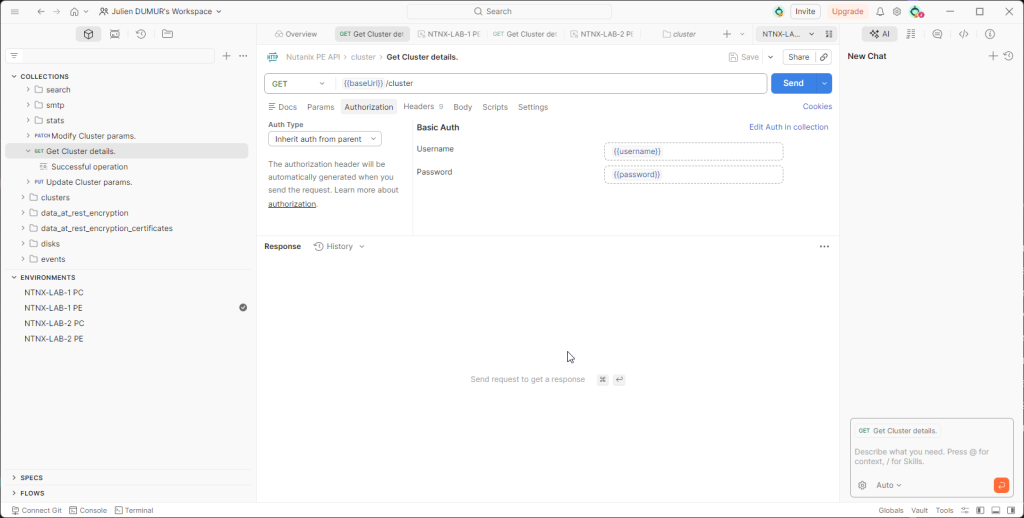
Daily, I switch between two go-to tools: Curl when I have a Linux/WSL terminal at hand (fast, raw, scriptable), and Postman when I need to visually explore Nutanix APIs.
If your workstation isn’t ready yet, I’ll point you directly to the dedicated article I’ve already written on this topic: Configure your Windows PC to query Nutanix APIs (WSL & Postman).
However, even when well-equipped, I regularly see admins tearing their hair out over their first Prism Element requests because of two crucial details.
The SSL certificate: By default, a Prism Element cluster uses a self-signed certificate. If you send a standard request, it will be violently rejected. The field reflex? Always add the
-k(or--insecure) flag in yourcurlcommands, and remember to disable the SSL certificate verification option in Postman settings.Authentication: The Prism Element v2.0 API relies on Basic Auth. Avoid passing your credentials in plain text in the URL of your request (like
https://admin:MySuperPass@IP...). It inevitably ends up in plain text in the history or logs. In Postman, use environment variables!
Exploring the API with the built-in REST API Explorer
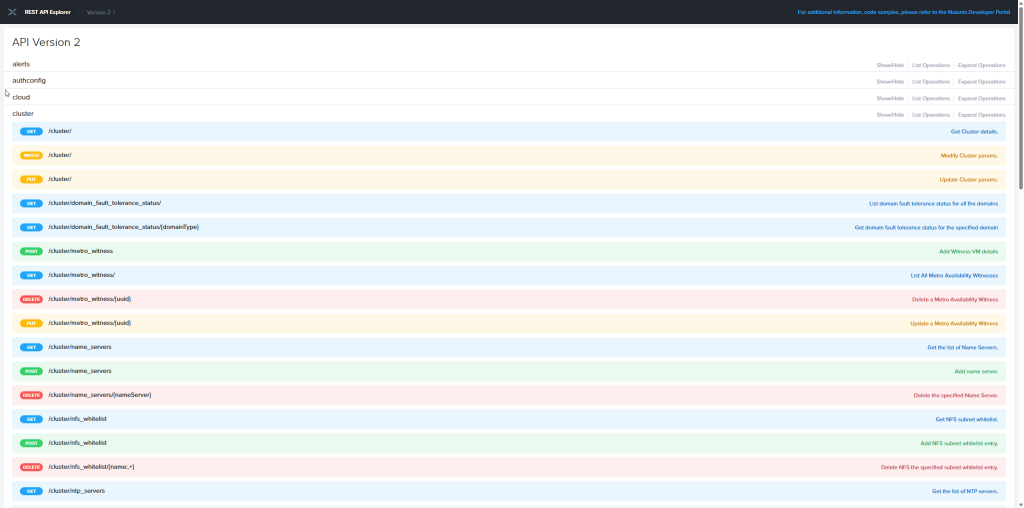
How many times have you banged your head against the wall looking for the right syntax in a 500-page PDF documentation? With Nutanix, forget about that. The best documentation isn’t on the support portal; it’s directly embedded in your cluster.
Prism Element natively integrates an interface called REST API Explorer. To access it, it’s very easy: log in to your cluster’s web interface, click on your username at the top right, then select REST API Explorer. You can also type the URL directly: https://<CVM_IP>:9440/api/nutanix/v2/api_explorer/index.html.
The true power of this Swagger isn’t just listing the endpoints (GET /cluster, POST /vms…). It’s its ability to code for you! Fill in the required fields in the interface and click the “Try it out!” button. Not only does the interface execute the request and display the raw JSON response, but above all, it generates the complete and perfectly formatted curl command. It’s the ultimate hack to save time and avoid syntax errors.
Conclusion
I won’t hide it from you, moving from CLI to REST API took a little effort to adapt. At first, I fumbled around, I grumbled at a malformed header or a temperamental JSON. But once you’ve crossed that milestone, it becomes almost natural. The API opens the doors to large-scale automation and continuous integration. However, you unfortunately won’t be able to find equivalents for every single CLI command…
In the next article of this series, we’re going to get to the heart of the matter. Enough theory, we’ll tackle practice with our first concrete use case: The complete health check of a cluster.
0 comments